How to Check backup log /and How to Delete backup log


introduction

Today i will explain how to monitor your backup is Saved on or no also How to Delete the old backup history from the log

How to Check your Backup log or your backup history

we can Check the backup history by this way but before this step i need from you to Create Databae “backupTest” and take backup from it with 3 types Full,DIFF,LOG

select Database_name,backup_start_date,backup_finish_date,type from msdb.dbo.backupset

you can select all Column (*) to see all information

but i will customize it to help you how to check the FULL backup , DiFF backup , Log backup

********************************Check FULL abckup history************************************

SELECT database_name,backup_start_date,type,recovery_model,server_name,machine_name,is_password_protected

FROM msdb.dbo.backupset where Type=‘D’ ORDER BY backup_set_id DESC

GO

********************************Check DIFF abckup history************************************

SELECT database_name,backup_start_date,type,recovery_model,server_name,machine_name,is_password_protected

FROM msdb.dbo.backupset where Type=‘i’

ORDER BY backup_set_id DESC

********************************Check LOG abckup history************************************

SELECT

database_name,backup_start_date,type,recovery_model,server_name,machine_name,is_password_protected

FROM msdb.dbo.backupset where Type=‘L’

ORDER BY backup_set_id DESC

GO

How to Delete your backup history:-

we can make delete for all backup history for any database by this Code

exec MSDB.DBO.sp_delete_database_backuphistory ‘Database name’

So this Code Delete history to the backup but for one database one by one so i will make Cursore to loop on all Server to get all database name then Delete the backup history for all Database

set ANSI_NULLSON

set QUOTED_IDENTIFIERON

go

Create PROC[dbo].DeletebackupHistory

AS

BEGIN

DECLARE @DB Nvarchar(50)

DECLARE GetDB CURSOR FOR

Select Name from Sys.Databases Where database_id> 4 and state_desc=‘ONLINE’

OPEN GetDB

FETCH NEXT FROM GetDB INTO @DB

WHILE @@FETCH_STATUS= 0

BEGIN

—-Delete backup history

exec MSDB.DBO.sp_delete_database_backuphistory @db

——————————-

FETCH NEXT FROM GetDB

INTO @DB

END— FETCH WHILE

CLOSE GetDB

DEALLOCATE GetDB

END


How to Change your Database Backup path After installation


After i install SQL Server i want to Change my backup path so leat’s See What i will do to change this path and Check it Change correct ot now

1- Open Start menu

2- open Run

3- Write RegEdit

4 – HKEY_LOCAL_MACHINE\SOFTWARE\Microsoft\Microsoft SQL Server\MSSQL11.SQL2012\MSSQLServer

Note : After this path {HKEY_LOCAL_MACHINE\SOFTWARE\Microsoft\Microsoft SQL Server\} you will select your SQL Server version i try this Example on SQL Server 2012 so i Select {MSSQL11.SQL2012}

5- in you write panal you will See BackupDirectory Write Click on it then modify then Write your new backup path

backup path

Check your backup path or See your backup path

DECLARE @BackupDirectoryVARCHAR(100)

EXEC master..xp_regread@rootkey=‘HKEY_LOCAL_MACHINE’,

@key=‘SOFTWARE\Microsoft\Microsoft SQL Server\MSSQL11.SQL2012\MSSQLServer’,

@value_name=‘BackupDirectory’,

@BackupDirectory=@BackupDirectoryOUTPUT

SELECT @BackupDirectory

Now if you want to return your datbase bakup path run this Script

EXEC  master..xp_regwrite

@rootkey=‘HKEY_LOCAL_MACHINE’,

@key=‘SOFTWARE\Microsoft\Microsoft SQL Server\MSSQL11.SQL2012\MSSQLServer’,

@value_name=‘BackupDirectory’,

@type=‘REG_SZ’,

@value=‘C:\Program Files\Microsoft SQL Server\MSSQL11.SQL2012\MSSQL\Backup’

SP Help you to take FULL,DIFF,LOG backup from all DB


Introducation

Database backup we have 3 typr from backup Full backup , Diffrential backup , log transaction backup now i write stored procedure make koop on all database on SQl Server instance then take backup from it this Stored procedure take 2 paramter

@BackupPath :- this the path of your hard disk

@backupType :- your database backup typy this parmater allow Number Value { 1 = Full backup , 2 = Diff backup , 3 = log Trans backup } any thing not like this 3 value Stored will give you Error.

Now you can Create this proc under your database master then you can call it

Note : if you want to put your database backup for starday in folder and Sunday in folder ……ETC please Check this Post http://wp.me/p1Oidq-1D

Create Stored Procedure TakeDBsBackupDaily

USE MASTER

GO

set ANSI_NULLSON

set QUOTED_IDENTIFIERON

GO

Create PROCEDURE[dbo].[TakeDBsBackupDaily]

@BackupPathnvarchar(500),@backupTypeint

AS

BEGIN

declare  @dnvarchar(2)

,@mnvarchar(2)

,@ynvarchar(4)

,@CurDatenvarchar(8)

,@hnvarchar(2)

,@minnvarchar(2)

,@secnvarchar(2)

,@CurTimenvarchar(8)

,@FNamenvarchar(500)

,@DbNamenvarchar(100)

,@BackupTypeNamenvarchar(200)

Set @d=DATEPART(“day”,(GETDATE()))

Set @m=DATEPART(“month”,(GETDATE()))

Set @y=DATEPART(“year”,(GETDATE()))

set @CurDate=replicate(‘0’,2len(@d))+@d+replicate(‘0’,2len(@m))+@m+replicate(‘0’,4len(@y))+@y

Set @h=DATEPART(“hour”,(GETDATE()))

Set @min=DATEPART(“minute”,(GETDATE()))

Set @sec=DATEPART(“second”,(GETDATE()))

set @CurTime=replicate(‘0’,2len(@h))+@h+replicate(‘0’,2len(@min))+@min+replicate(‘0’,2len(@sec))+@sec

DECLARE bK CURSORFOR

SELECT name FROM sys.databases WHERE Database_ID> 4 andstate_desc=‘Online’

OPENbk

FETCH NEXT FROM bk

INTO @DbName

WHILE @@FETCH_STATUS=0

BEGIN

—–FULL backup

IF @backupType= 1

begin

SET @FName= @BackupPath+‘\’+@DbName  +‘_D_’+@curdate+‘_FULL’+‘.bak’

print‘Backing up Database : ‘+@DbName+‘ …’

set @BackupTypeName=  @DbName+‘-FULL Database Backup’

PRINT @FName

BACKUP DATABASE @DbNameTO  DISK=@FName   WITH NOFORMAT,INIT, NAME = @BackupTypeName , SKIP, NOREWIND,NOUNLOAD,STATS= 10

End

—DIFF backup

Else IF @backupType = 2

begin

SET @FName = @BackupPath+‘\’+@DbName  +‘_D_’+@curdate+‘_DIFF’+‘.bak’

print‘Backing up Database : ‘+@DbName+‘ …’

set @BackupTypeName = @DbName+‘-DIFF Database Backup’

PRINT@FName

BACKUP DATABASE @DbNameTO  DISK = @FName WITH DIFFERENTIAL,NOFORMAT,NOINIT,  NAME = @BackupTypeName,SKIP,NOREWIND,NOUNLOAD,  STATS= 10

End

—Log backup

Else IF@backupType= 3

begin

SET @FName = @BackupPath+‘\’+@DbName  +‘_D_’+@curdate+‘Log’+‘.bak’

print‘Backing up Database : ‘+@DbName+‘ …’

set @BackupTypeName = @DbName+‘-Log_Trans Database Backup’

PRINT@FName

BACKUP LOG @DbNameTO  DISK = @FName WITH NOFORMAT,NOINIT,  NAME = @BackupTypeName,SKIP,NOREWIND,NOUNLOAD,  STATS = 10

End

Else


RAISERROR(‘Invalid Backup Type value.

Must be Write your Database backup type

1 = FULL backup

2 = Diffrential backup

3 = log Transaction backup

Or Contact the Adminstrator Mostafa Elmasry 0593205711′, 16, 1);

FETCH NEXT FROM bk

INTO @DbName

END

CLOSE bk

DEALLOCATE bk

END

####################################################################################

now try to Execute your Stored Procedure

Full backup

exec [TakeDBsBackupDaily] ‘E:\backups\Log’,1

DIFF backup

exec [TakeDBsBackupDaily] ‘E:\backups\Log’,2

Log backup

exec [TakeDBsBackupDaily] ‘E:\backups\Log’,3

How to send Email With Tabel Foramt by Database Mail


Introduction

Any DBA or developer use Database mail Future need to send Email with Special Formate like if you need to send Query from your Database to the Customer but you want to put the result in Table What Will you Do leat’s learn how to send Email with tabel format but in the first you must configure database mail server in youe SQL Server so Read this Article about how to Configure Database mail server http://wp.me/p1Oidq-9A  also you can Check this link now i will do :

1- Create HR_EMP Table

2- Insert Data into HR_EMP Table

3- Define 2 variable @XML to send the Query with XML , @body to bulid the body of tabel with HTML

CREATE TABLEHR_EMP(

[EMP_ID]  int,

[EMP_Name]  Nvarchar(50),

[VISA_Start_Date]Nvarchar(50),

Visa_END_DateNvarchar(50))

INSERT INTO HR_EMP

SELECT 1,‘Mostafa Elmasry’,’18/05/2010′,’18/05/2012′

UNION ALL

SELECT 2,‘Moahmed Osman’,’01/01/2011′,’01/01/2013′

UNION ALL

SELECT 3,‘mahmoude Darwish’,’27/09/2010′,’27/09/2012′

DECLARE @xmlNVARCHAR(MAX)

DECLARE @bodyNVARCHAR(MAX)

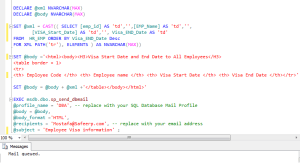
SET @xml=CAST((SELECT[emp_id]AS‘td’,,[EMP_Name]AS‘td’,,[VISA_Start_Date]AS‘td’,,Visa_END_DateAS‘td’ FROM HR_EMPORDERBYVisa_END_DateDesc FOR XMLPATH(‘tr’),ELEMENTS)ASNVARCHAR(MAX))

SET @body=‘<html><body><H3>Visa Start Date and End Date to All Employees</H3>

<table border = 1>

<tr>

<th> Employee Code </th> <th> Employee name </th> <th> Visa Start Date </th> <th> Visa End Date </th></tr>’

SET @body=@body+@xml+‘</table></body></html>’

—–Let’s Send Email Now

EXEC msdb.dbo.sp_send_dbmail

@profile_name =‘DBA’,— replace with your SQL Database Mail Profile

@body =@body ,

@body_format=‘HTML’,

@recipients =‘Mostafa@Safeerp.com’,— replace with your email address

@subject =‘Employee Visa information’;

Send mail with table format


Decryption Encrypted SP,View,Function in MSSQL


introduction

in SQL Server we can Create Stored procedure , View and Function with Encryption option by this option  no body can see the text of the object so a lot of Developer and DBA use this option to protect his Code but the problem down when any one of them forget what he write in this Encryption object it’s big problem because he can’t make Alter to this Encryption object but today we will learn how to troubleshot this  problem by creating stored procedure make Decryption to any Encrypted object it will show to me the text write in the encryption object

NOTE : this SP I’m not create it but I take it copy from the internet

1- Create Encryption Stored procedure

Create PROC getdatabase_Name

With Encryption option

as

Begin

Select name from sys.Databases where Database_id > 4

End

2- try to display code text

EXEC sp_helptext ‘getdatabase_Name’;

SQL server will tell you this Stored is Encrypted so you can’t see the Code text

3- Create SP to show Code text for any encryption object

CREATE PROCEDURE dbo.ShowDecrypted(@ProcName SYSNAME = NULL)

AS

–Jon Gurgul 27/09/2010

–Adapted idea/code from shoeboy/joseph gama

SET NOCOUNT ON

IF EXISTS

(

SELECT * FROM sys.dm_exec_connections ec JOIN sys.endpoints e

on (ec.[endpoint_id]=e.[endpoint_id])

WHERE e.[name]=’Dedicated Admin Connection’

AND ec.[session_id] = @@SPID

)

BEGIN

DECLARE @i BIGINT,@a NVARCHAR(MAX),@b NVARCHAR(MAX),@d NVARCHAR(MAX),@c NVARCHAR(MAX)

SET @a=(SELECT [imageval] FROM [sys].[sysobjvalues] WHERE [objid] = OBJECT_ID(@ProcName) and [valclass] = 1 and [subobjid] = 1)

SET @b=’ALTER PROCEDURE ‘+ @ProcName +’ WITH ENCRYPTION AS ‘+REPLICATE(‘-‘, 8000)

BEGIN TRANSACTION

EXECUTE (@b)

SET @c=(SELECT [imageval] FROM [sys].[sysobjvalues] WHERE [objid] = OBJECT_ID(@ProcName) and [valclass] = 1 and [subobjid] = 1)

ROLLBACK TRANSACTION

SET @d = REPLICATE(N’A’, (DATALENGTH(@a) /2 ))

SET @i=1

WHILE @i<=(DATALENGTH(@a)/2)

BEGIN

SET @d = STUFF(@d, @i, 1,NCHAR(UNICODE(SUBSTRING(@a, @i, 1)) ^(UNICODE(SUBSTRING(‘CREATE PROCEDURE ‘+ @ProcName +’ WITH ENCRYPTION AS ‘ + REPLICATE(‘-‘, 8000), @i, 1)) ^UNICODE(SUBSTRING(@c, @i, 1)))))

SET @i=@i+1

END

SELECT @d [StoredProcedure]

END

ELSE

BEGIN

PRINT ‘Use a DAC Connection’

END

SET QUOTED_IDENTIFIER OFF

GO

SET ANSI_NULLS ON

GO

4- no try to Execute your SP

EXCE  ShowDecrypted ‘getdatabase_Name’