What is the Stander listener port in Database Mirroring Configuration?


If you Create the 3 SQL Servers in the same PC

Begin

you must use difference port

Principle Server use the Stander port number 5021

Mirroring Server use the Stander port number 5022

Witness Server use the Stander port number 5023

End

Else The 3 SQL in 3 different PC

You can use one port like 5021

Don’t Forget to Disable Firewall or must be open this ports on the Firewall

Get all Database Job History then Send Email


***************************************************Introduction********************************************************

Today i will Dessecus how to Get all Database job history then Send Email to The Technical Support “job History Report” then i will delete this log history

Get Daatabase job history

select * from msdb.dbo.sysjobs

Job history

Get database job Step history

select * from msdb.dbo.sysjobhistory

Hob Step History

Now i will make join between msdb.dbo.sysjobhistory and msdb.dbo.sysjobs by Job_ID  and i will  Convert the job tun Date time because if you select it without convert you will sedd the Data Formate “20121224” so i will convert it , also i have column name “Run_Status” this Column return 0 or 1 { 0 = the job is Failed , 1 = The job is Success } so i will make Case when on this Column this Script you can use it for to ways

1- job Failed history report

2- job Success history Report

but i will write now ho to get job all history Failed and Success

select J.job_id,J.nameas[Job Name],S.step_name,S.step_id,

CONVET (DATETIME,RTRIM(S.run_date))+(S.run_time* 9 +S.run_time% 10000 * 6 +S.run_time% 100 * 10)/ 216e4 asRun_Date_Time,

RIGHT(‘000000’+CONVERT(varchar(6),S.run_duration), 6)as[Run Duration],

CASE S.run_status

WHEN 0 THEN‘JOB FAIL’

WHEN 1 THEN‘JOB Success’

END

,S.message,S.server,  CONVERT(DATETIME,RTRIM(S.run_date))+(S.run_time* 9 +S.run_time% 10000 * 6 +S.run_time% 100 * 10)/ 216e4 asRun_Date_Time

from  msdb.dbo.sysjobhistory as S innerjoin msdb.dbo.sysjobs as J

on s.job_id=J.job_id

where Step_id<> 0

/*

************************************ Send Email With Database job History Report**************************************

If you need to know hot Configure your database mail See this post in the First http://wp.me/p1Oidq-9A

*/

DECLARE @xmlNVARCHAR(MAX)

DECLARE @bodyNVARCHAR(MAX)

SET @xml=CAST((SELECTJ.nameAS‘td’,,S.step_nameAS‘td’,,S.step_idAS‘td’,”,CASES.run_status

WHEN 0 THEN‘JOB FAIL’

WHEN 1 THEN‘JOB Success’

END AS‘td’,

,CONVERT(DATETIME,RTRIM(S.run_date))+(S.run_time* 9 +S.run_time% 10000 * 6 +S.run_time% 100 * 10)/ 216e4  AS‘td’,”,S.messageAS‘td’

from msdb.dbo.sysjobhistory as S innerjoin msdb.dbo.sysjobs as J

on s.job_id=J.job_id

where Step_id<> 0

FOR XMLPATH(‘tr’),ELEMENTS)ASNVARCHAR(MAX))

SET @body=‘<html><body><H3>Database job history</H3>

<table border = 1>

<tr><font color=blue size=5 >

<td> Job Name </td> <td> Step Name </td> <td> Step ID </td> <td> Job Status </td> <td> Job_Run_Time </td> <td> message </td></font></tr>’

SET @body=@body+@xml+‘</table></body></html>’

EXEC msdb.dbo.sp_send_dbmail

@profile_name =‘DBA’,— replace with your SQL Database Mail Profile

@body =@body,

@body_format =‘HTML’,

@recipients =‘Mostafa@Safeerp.com’,— replace with your email address

@subject =‘Database job History’;

Report in Email

/*

************************************ Cleare job history**************************************************

If you need to know hot Configure your database mail See this post in the First

*/

EXEC MSDB.dbo.sp_purge_jobhistory

@job_name=N’testsenemail’; — JOB Nmar

GO

How to Check backup log /and How to Delete backup log


introduction

Today i will explain how to monitor your backup is Saved on or no also How to Delete the old backup history from the log

How to Check your Backup log or your backup history

we can Check the backup history by this way but before this step i need from you to Create Databae “backupTest” and take backup from it with 3 types Full,DIFF,LOG

select Database_name,backup_start_date,backup_finish_date,type from msdb.dbo.backupset

you can select all Column (*) to see all information

but i will customize it to help you how to check the FULL backup , DiFF backup , Log backup

********************************Check FULL abckup history************************************

SELECT database_name,backup_start_date,type,recovery_model,server_name,machine_name,is_password_protected

FROM msdb.dbo.backupset where Type=‘D’ ORDER BY backup_set_id DESC

GO

********************************Check DIFF abckup history************************************

SELECT database_name,backup_start_date,type,recovery_model,server_name,machine_name,is_password_protected

FROM msdb.dbo.backupset where Type=‘i’

ORDER BY backup_set_id DESC

********************************Check LOG abckup history************************************

SELECT

database_name,backup_start_date,type,recovery_model,server_name,machine_name,is_password_protected

FROM msdb.dbo.backupset where Type=‘L’

ORDER BY backup_set_id DESC

GO

How to Delete your backup history:-

we can make delete for all backup history for any database by this Code

exec MSDB.DBO.sp_delete_database_backuphistory ‘Database name’

So this Code Delete history to the backup but for one database one by one so i will make Cursore to loop on all Server to get all database name then Delete the backup history for all Database

set ANSI_NULLSON

set QUOTED_IDENTIFIERON

go

Create PROC[dbo].DeletebackupHistory

AS

BEGIN

DECLARE @DB Nvarchar(50)

DECLARE GetDB CURSOR FOR

Select Name from Sys.Databases Where database_id> 4 and state_desc=‘ONLINE’

OPEN GetDB

FETCH NEXT FROM GetDB INTO @DB

WHILE @@FETCH_STATUS= 0

BEGIN

—-Delete backup history

exec MSDB.DBO.sp_delete_database_backuphistory @db

——————————-

FETCH NEXT FROM GetDB

INTO @DB

END— FETCH WHILE

CLOSE GetDB

DEALLOCATE GetDB

END


How to Change your Database Backup path After installation


After i install SQL Server i want to Change my backup path so leat’s See What i will do to change this path and Check it Change correct ot now

1- Open Start menu

2- open Run

3- Write RegEdit

4 – HKEY_LOCAL_MACHINE\SOFTWARE\Microsoft\Microsoft SQL Server\MSSQL11.SQL2012\MSSQLServer

Note : After this path {HKEY_LOCAL_MACHINE\SOFTWARE\Microsoft\Microsoft SQL Server\} you will select your SQL Server version i try this Example on SQL Server 2012 so i Select {MSSQL11.SQL2012}

5- in you write panal you will See BackupDirectory Write Click on it then modify then Write your new backup path

backup path

Check your backup path or See your backup path

DECLARE @BackupDirectoryVARCHAR(100)

EXEC master..xp_regread@rootkey=‘HKEY_LOCAL_MACHINE’,

@key=‘SOFTWARE\Microsoft\Microsoft SQL Server\MSSQL11.SQL2012\MSSQLServer’,

@value_name=‘BackupDirectory’,

@BackupDirectory=@BackupDirectoryOUTPUT

SELECT @BackupDirectory

Now if you want to return your datbase bakup path run this Script

EXEC  master..xp_regwrite

@rootkey=‘HKEY_LOCAL_MACHINE’,

@key=‘SOFTWARE\Microsoft\Microsoft SQL Server\MSSQL11.SQL2012\MSSQLServer’,

@value_name=‘BackupDirectory’,

@type=‘REG_SZ’,

@value=‘C:\Program Files\Microsoft SQL Server\MSSQL11.SQL2012\MSSQL\Backup’

How to send Email With Tabel Foramt by Database Mail


Introduction

Any DBA or developer use Database mail Future need to send Email with Special Formate like if you need to send Query from your Database to the Customer but you want to put the result in Table What Will you Do leat’s learn how to send Email with tabel format but in the first you must configure database mail server in youe SQL Server so Read this Article about how to Configure Database mail server http://wp.me/p1Oidq-9A  also you can Check this link now i will do :

1- Create HR_EMP Table

2- Insert Data into HR_EMP Table

3- Define 2 variable @XML to send the Query with XML , @body to bulid the body of tabel with HTML

CREATE TABLEHR_EMP(

[EMP_ID]  int,

[EMP_Name]  Nvarchar(50),

[VISA_Start_Date]Nvarchar(50),

Visa_END_DateNvarchar(50))

INSERT INTO HR_EMP

SELECT 1,‘Mostafa Elmasry’,’18/05/2010′,’18/05/2012′

UNION ALL

SELECT 2,‘Moahmed Osman’,’01/01/2011′,’01/01/2013′

UNION ALL

SELECT 3,‘mahmoude Darwish’,’27/09/2010′,’27/09/2012′

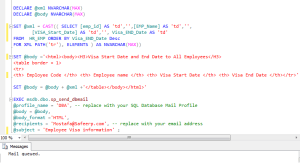
DECLARE @xmlNVARCHAR(MAX)

DECLARE @bodyNVARCHAR(MAX)

SET @xml=CAST((SELECT[emp_id]AS‘td’,,[EMP_Name]AS‘td’,,[VISA_Start_Date]AS‘td’,,Visa_END_DateAS‘td’ FROM HR_EMPORDERBYVisa_END_DateDesc FOR XMLPATH(‘tr’),ELEMENTS)ASNVARCHAR(MAX))

SET @body=‘<html><body><H3>Visa Start Date and End Date to All Employees</H3>

<table border = 1>

<tr>

<th> Employee Code </th> <th> Employee name </th> <th> Visa Start Date </th> <th> Visa End Date </th></tr>’

SET @body=@body+@xml+‘</table></body></html>’

—–Let’s Send Email Now

EXEC msdb.dbo.sp_send_dbmail

@profile_name =‘DBA’,— replace with your SQL Database Mail Profile

@body =@body ,

@body_format=‘HTML’,

@recipients =‘Mostafa@Safeerp.com’,— replace with your email address

@subject =‘Employee Visa information’;

Send mail with table format