Introduction to mirroring
- Database mirroring is ( log shipping + replication ) – some of issues in log shipping and replication.
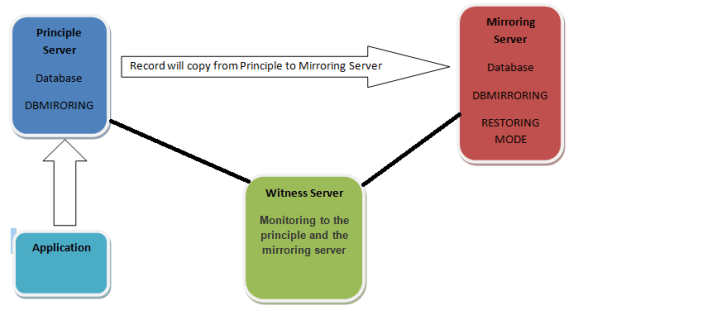
- In database mirroring section you have 3 servers (principle, mirroring, and witness).
- The database will be in the principle server and the application will be connect to the principle server then you will take backup (Full + log) from the database in the principle server the make restore to this backup with no recovery option in the mirroring. server so the record will copy from the principle server to the mirror server.
- Witness server will be monitoring to the principle and the mirroring server.
- You can setup the principle server in domain and the mirroring server in another domain
What happens if the principle server down in high availability mode?
if the principle server down the mirroring server will be the new principle server and the application will be connect automatically to the new principle server (mirroring server)
What happened when the application connect to the database in the principle server?
When the Application connect to the principle server and users make any transaction on this database the record will write in log puffer memory in principle server then write it in log file in database then the log puffer send the record to the log puffer memory to the mirroring server then the log puffer write this record in log file in database. Then the mirror server send to the principle server massage to know the principle the transaction is succeed then the principle tell the application the transaction is succeed.
Operation modes
You can setup the mirroring server in 3 modes
- High availability.
In high availability you need 3 servers (principle server, mirroring server, witness server) so in this operation mode the application connect on the principle server then the transaction write in log file then the principle server send the record to the mirror server in log file the mirror send to the principle (the record is commit) then the principle send to the application the transaction is committed
- High safety.
In high safety mode we don’t need to the witness server we will need in this section to the principle server and the mirror server only so there’s no automatic failover in high safety mode. And the operation will be same in the high availability mode [application connect on the principle server then the transaction write in log file then the principle server send the record to the mirror server in log file the mirror send to the principle (the record is commit) then the principle send to the application the transaction is committed ]
Remarks: the difference between high availability mode and high safety mode is Automatic failover in high availability will found Automatic failover but in high safety will not found Automatic failover. So if the principle server down you have problem because you will make manually start the mirroring server to be principle server. Not like in high availability mode this operation make automatically because this operation mode have automatic failover.
- High performance.
In high performance mode you need 2 server (principle server , mirror server) like high safety mode . So the difference between the high performance mode and high safety mode is in high performance the application send the transaction to the principle server in log file then the principle send the record to the mirror server and send to the application the transaction is committed so the principle server don’t wait the mirror server like (high safety mode and high availability mode)
|
Operation mode
|
servers
|
Automatic failover
|
Principle wait the mirror
|
|
High availability
|
3 servers
|
Yes
|
Yes
|
|
High safety
|
2 servers
|
No
|
Yes
|
|
High performance
|
2 servers
|
No
|
No
|

In the finale I explain what is mirroring? , what is the operation mode in mirroring? , what is the difference between operation mode in mirroring? , remember I tell you high safety and high performance not need witness server but you can create witness server in this operation mode but it will make problems whit you so don’t make witness server in high safety mode and high performance mode .
Mirroring requirements:
1- The database and file location should be same.
2- Collection and master code page should be same in the principle and mirror server.
3- Database name should be same in the principle and mirror server.
4- You cannot mirror more the 10 databases in 32 bit servers you can in 64 bit server but not recommended.
5- You cannot use attach/de attach you can use backup and restore.
6- Ports in mirroring should be opening in firewall or close the firewall.
7- Services account In SQL and SQL agent should be same in all servers.
8- The mirroring not support the cross database transaction & distributed transaction log
9- SQL server number should be same but you can setup principle server on SQL Server 2008 service pack 1 and the mirror on SQL Server services pack two
Advantages of database mirroring :
1- Does not require special hardware (such as shared storage, heart-beat connection) and cluster ware, thus potentially has lower infrastructure cost
2- Database mirroring supports full-text catalogs
3- Hardware and software upgrade that’s very easy.
Remark: If you want upgrade the mirror server from SQL server 2008 R2 to denial you must pass the mirroring in this section then after upgrade start the mirroring again
4- Increases the data protection (disaster recovery).
5- Increases the database availability if you use the Sync mode.
6- Cost of database mirroring is less than clustering.
7- It’s robust and efficient than log shipping and replication.
8- Failover is fast compare to cluster
9- Mirror server can be used to host databases for other applications not like clustering.
Disadvantage of database mirroring:
1- Mirroring doesn’t support file stream.
2- Mirror server is not available for database read only.
3- Mirror server working in database level not in server level not like clustering (in clustering failover you make this in server level on all database in this server in logins in jobs like this)
Mirroring enhancement in SQL Server 2008 from 2005:
Reference: [http://www.sqlserver-training.com/database-mirroring-enhancements-in-sql-server-2008-from-2005/-]
1) Database mirroring automatic page repair.
- If a page on the principle or mirror server is corrupt, it is automatically replaced with the corresponding copy on its partner
- Some page types cannot be automatically repaired:
- File header pages
- Database boot page
- Allocation pages
2) Compressed Data flow
- Data Flow between the principle and mirror server is now compressed to improve performance.
3) Manual Failover
- Manual failover no longer require a database restart
4) Log performance
- log-send buffers
- Page read-ahead
- Write-ahead on the incoming log stream on the mirror server
Part 2 >>>https://mostafaelmasry.wordpress.com/2011/12/22/mirroring-in-sql-server-part-2/



 DB Cloud TECH