How to add or replace database mirroring witness to an existing Mirroring Database?


After i finish my work in Database Mirroring with operation Mode (high Safty ). i explorer it will not be Automatic failover becouse this option if you need it you must configure your mirroring with operation mode (High Availability Synchonous) and this Operation Mode need 3 Servers (Principle , Mirroring , Witness) So i will Show now how to add or Replace mirroring Database Witness Server

1- Now this my mirroing operation mode it’s high safty without automatic and the witness Server not Configure

Mirroring operation mode

2- Click on Configure Secuirty after this mirroring will Ask you if you nedd to Configure Witness Server or not Select yes

Configure Witness

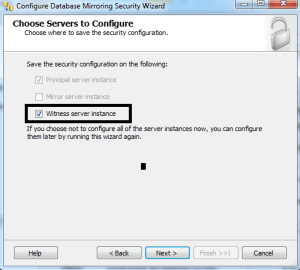
3- Check Witness Server

Check Witness Server

4- mirroring will return the principle server configuration

principle Configuration

5- Select Witness Server

Select Witness Server

6- Configure Witness Server and the port listner

Configure Witness

7- Put Services Account in my experince if you working in Workgroup and your all instance in the same windows like thie example create new user Administrator on your pc and add him in SQl Server login the use it ElSE if you use Workgroup but the SQl Servers not all in the Same pc you will use 3 Windows or 2 create Certification in your SQL Server and i will show it in the next post who to create Mirroroing With Login Certification .
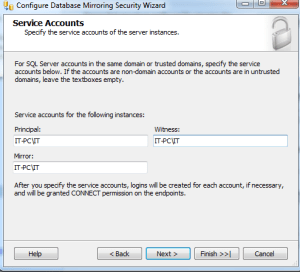
Account Services

8- After this Step Click finish No your database witness is Configured

Witness is Configuerd

Now your Configuration is Complete and if you comapre between image no 8 and image no 1 you will see the difference you will see now we have Mirroring With operation mode high safty With Automatic failover

NOTE :

in Step no 6 you will See i write the port no is 5023 but when i finish my Steps and arraive to step no 8 then click on ok i reicive this Error :

TITLE: Microsoft SQL Server Management Studio ——————————

Alter failed for Database ‘ACC2012’.  (Microsoft.SqlServer.Smo)

For help, click: http://go.microsoft.com/fwlink?ProdName=Microsoft+SQL+Server&ProdVer=11.0.3000.0+((SQL11_PCU_Main).121019-1322+)&EvtSrc=Microsoft.SqlServer.Management.Smo.ExceptionTemplates.FailedOperationExceptionText&EvtID=Alter+Database&LinkId=20476

—————————— ADDITIONAL INFORMATION:

An exception occurred while executing a Transact-SQL statement or batch. (Microsoft.SqlServer.ConnectionInfo)

——————————

The ALTER DATABASE command could not be sent to the remote server instance ‘TCP://IT-PC:5023’. The database mirroring configuration was not changed. Verify that the server is connected, and try again. (Microsoft SQL Server, Error: 1456)

For help, click: http://go.microsoft.com/fwlink?ProdName=Microsoft%20SQL%20Server&ProdVer=10.50.2500&EvtSrc=MSSQLServer&EvtID=1456&LinkId=20476

—————————— BUTTONS:

OK ——————————

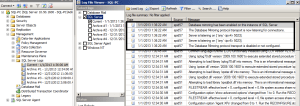
i don’t know what is error i search more and more on the internet but i don’t found good Soluation but when i checked the SQL Server log i see somthing say { SQL Server can not listen to the port No 5023 }

So i Recounfigured the mirroring again and Change the port for the Witness Server form 5023 to 5024 it’s Working now very good so before any thing or before you go to internet Please try to check :

SQL Server log

Windows Event Wiewr

This very good help to know what’s the really problem
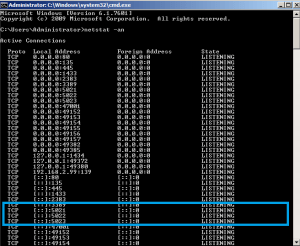
 

HOW TO CHECK YOUR SQL SERVER MIRROING IS RUNNING OR NOT ?


HOW TO CHECK YOUR MIRROING IS RUNNING OR NOT ?

you can Check :

1-  port number listener : open CMD and write this Command  ” netstat -an ” you will see the 3 port for the 3 Servers Principle – mirroring – Witness also I see the 3 port because I setup the 3 SQL Server Instance in the same  Windows Server

Check port

2-  Event Viewer for Windows Server

Event Viewr

3-  SQL Server Database Log

SQl Server Log

4-  Check Endpoint Status

Check Endpoint


What is the Stander listener port in Database Mirroring Configuration?


If you Create the 3 SQL Servers in the same PC

Begin

you must use difference port

Principle Server use the Stander port number 5021

Mirroring Server use the Stander port number 5022

Witness Server use the Stander port number 5023

End

Else The 3 SQL in 3 different PC

You can use one port like 5021

Don’t Forget to Disable Firewall or must be open this ports on the Firewall

Get all Database Job History then Send Email


***************************************************Introduction********************************************************

Today i will Dessecus how to Get all Database job history then Send Email to The Technical Support “job History Report” then i will delete this log history

Get Daatabase job history

select * from msdb.dbo.sysjobs

Job history

Get database job Step history

select * from msdb.dbo.sysjobhistory

Hob Step History

Now i will make join between msdb.dbo.sysjobhistory and msdb.dbo.sysjobs by Job_ID  and i will  Convert the job tun Date time because if you select it without convert you will sedd the Data Formate “20121224” so i will convert it , also i have column name “Run_Status” this Column return 0 or 1 { 0 = the job is Failed , 1 = The job is Success } so i will make Case when on this Column this Script you can use it for to ways

1- job Failed history report

2- job Success history Report

but i will write now ho to get job all history Failed and Success

select J.job_id,J.nameas[Job Name],S.step_name,S.step_id,

CONVET (DATETIME,RTRIM(S.run_date))+(S.run_time* 9 +S.run_time% 10000 * 6 +S.run_time% 100 * 10)/ 216e4 asRun_Date_Time,

RIGHT(‘000000’+CONVERT(varchar(6),S.run_duration), 6)as[Run Duration],

CASE S.run_status

WHEN 0 THEN‘JOB FAIL’

WHEN 1 THEN‘JOB Success’

END

,S.message,S.server,  CONVERT(DATETIME,RTRIM(S.run_date))+(S.run_time* 9 +S.run_time% 10000 * 6 +S.run_time% 100 * 10)/ 216e4 asRun_Date_Time

from  msdb.dbo.sysjobhistory as S innerjoin msdb.dbo.sysjobs as J

on s.job_id=J.job_id

where Step_id<> 0

/*

************************************ Send Email With Database job History Report**************************************

If you need to know hot Configure your database mail See this post in the First http://wp.me/p1Oidq-9A

*/

DECLARE @xmlNVARCHAR(MAX)

DECLARE @bodyNVARCHAR(MAX)

SET @xml=CAST((SELECTJ.nameAS‘td’,,S.step_nameAS‘td’,,S.step_idAS‘td’,”,CASES.run_status

WHEN 0 THEN‘JOB FAIL’

WHEN 1 THEN‘JOB Success’

END AS‘td’,

,CONVERT(DATETIME,RTRIM(S.run_date))+(S.run_time* 9 +S.run_time% 10000 * 6 +S.run_time% 100 * 10)/ 216e4  AS‘td’,”,S.messageAS‘td’

from msdb.dbo.sysjobhistory as S innerjoin msdb.dbo.sysjobs as J

on s.job_id=J.job_id

where Step_id<> 0

FOR XMLPATH(‘tr’),ELEMENTS)ASNVARCHAR(MAX))

SET @body=‘<html><body><H3>Database job history</H3>

<table border = 1>

<tr><font color=blue size=5 >

<td> Job Name </td> <td> Step Name </td> <td> Step ID </td> <td> Job Status </td> <td> Job_Run_Time </td> <td> message </td></font></tr>’

SET @body=@body+@xml+‘</table></body></html>’

EXEC msdb.dbo.sp_send_dbmail

@profile_name =‘DBA’,— replace with your SQL Database Mail Profile

@body =@body,

@body_format =‘HTML’,

@recipients =‘Mostafa@Safeerp.com’,— replace with your email address

@subject =‘Database job History’;

Report in Email

/*

************************************ Cleare job history**************************************************

If you need to know hot Configure your database mail See this post in the First

*/

EXEC MSDB.dbo.sp_purge_jobhistory

@job_name=N’testsenemail’; — JOB Nmar

GO