Customized Database-Server Alert Part#1


Problem 

AlertHello my Followers as we are working as Database administrators (DBA) we can’t stay on our office 24 hour we should enjoy and by the other things in the life but we still responsible about the stability of Production databases should be accessible in any time with the optimal performance so at this time we should leave something working 24 Hour in our servers to monitors the servers and send to us what is happening immoderately. the market have a lot of Product and lot of tools for Monitoring SQL Server from IO , CPU , backup , Security and Database Performance but not all the organization have the capital to provide you all of this tools at this time you should depend on your self because you are still the Responsible person In front of all the management so in this post and other posts i will publish very important and impressive Customized Database Alert depended on T-SQL (DMV Alert ) also i write in the SQL Server alert type or category and How we can configure it .


Part#1  , Part#2

SQL Server Database alert Type :

  1. Warning Alert
  2. Critical Alert
  3. OS Alert
  4. Customized Database alert (DMV_Alert) this point i will start with it because it is not easy like the previous points it is need some one have good Experience in T-SQL (handmade alert)

Customized database alert list :

this is List by the Database alerts i will explain it one by one and we will go deeply for each one to know the mechanizm of the Stored procedure and How it work and How we can update on it based on our work environment

  • Database status Report
  • Read_Only Database Report
  • Backup Running Now
  • Check backup History
  • Check_ServicesStatus_Reporting
  • Disabled SQL Server Jobs
  • Disk Space Alert
  • SQLServerRestartAlert_1
  • SQLServerRestartAlert_2
  • sp_check_log_shipping_monitor_alert
  • Trg_TrackLoginManagement (Secuirty Trigger)
  • Keep Your DB in Safe Mode (Database Drop/Edit Trigger)
  • Database DDL Alert
  • Job Status Alert (Job Status Trigger to catch any action happened on the jobs status)

I am not remember all the list i will update it ASAP now let us start by the first DMV Alert but before this we should know

Continue reading “Customized Database-Server Alert Part#1”

Check and Enable Automatic Statistic Update on Database Level


AS SQL Server Best Practices: Auto-Create and Auto-Update Statistics Should Be On – Most of the Time in general they are a very good thing for performance. You could try to figure out which columns need statistics, but it’s often better to let SQL Server do that for you.You can turn on the AUTO_CREATE_STATISTICS database option and SQL Server will automatically determine when it needs the Statistics and create them for you.

Check And Enable Automatic Statistic Update on all databases have this option is disable

Select ‘ALTER DATABASE [‘+Name+’] SET AUTO_CREATE_STATISTICS ON;
GO
ALTER DATABASE [‘+Name+’] SET AUTO_UPDATE_STATISTICS ON;
GO
‘ from Sys.Databases where is_auto_update_stats_on = 0 or is_auto_create_stats_on = 0

Take the Result and Execute it in another session

Update Statistics

To check all my posts you godirect to my personal website or you can download this Excel sheet My Technical POSTS

View all my tips , LinkedIn Slideshare ,Youtube Channel.My posts in MSDN

How to build , Manage and monitor your SQL Server replication


Hello my friends this my small post in SQL Server replication it is not everything about replication but at least it is the what any DBA should know it 11 Posts in SQL Server replication technology english and arabic posts

  • What is SQL Replication?
  • Types of SQL Replication
  • Replication Overview
  •  How to create Transaction Replication
  • How to Add New Publisher Server to the Distributor Server
  •  Disable Publishing and Distribution Servers
  • Publication Status
  • Subscription Status
  • Replication information for the Complete setup
  • Find publication article
  • How we can Check Distributor agent status
  • How we can Check log reader agent status

downloadreplica

All this previous point you can know it easily from the below Posts :

  1. Replication in SQL Server Part 1
  2. Replication in SQL Server Part 2
  3. Replication in SQL Server Part 3
  4. Replication in SQL Server Part 4
  5. SQL Server DMV Replication Monitoring Part 1
  6. SQL Server DMV Replication Monitoring Part 2
  7. SQL Server DMV Replication Monitoring Part 3
  8. SQL Server DMV Replication Monitoring Part 4
  9. الأكواد الديناميكية لمراقبة ومتابعة حلول تزامن البيانات 1/ 3
  10. الأكواد الديناميكية لمراقبة ومتابعة حلول تزامن البيانات 2/ 3
  11. الأكواد الديناميكية لمراقبة ومتابعة حلول تزامن البيانات 3/ 3

Follow me because i will do one online session in replication and i will enhance all this posts by adding lot of other information in replication .

To check all my posts you can direct to my personal website or you can download this Excel sheet My Technical POSTS

View all my tips , LinkedIn Website Slideshare ,Youtube Channel.

Where is index location on Database?


Where is index location on Database? 

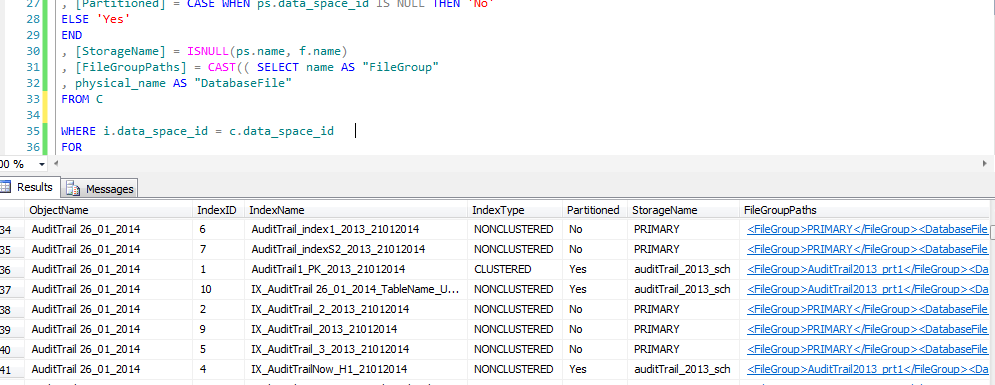
Hi guys today I will show smoothing is easy but more important to know about it {Where is the index live} by the below DMV we can return all the index with table name and with File group hosted on it , another thing you can use this DMV to know the heap tables , Clustered index , non-Clustered index

Index Location:

WITH C AS
(

SELECT ps.data_space_id
, f.name
, d.physical_name
FROM sys.filegroups f
JOIN sys.database_files d ON d.data_space_id = f.data_space_id
JOIN sys.destination_data_spaces dds ON dds.data_space_id = f.data_space_id
JOIN sys.partition_schemes ps ON ps.data_space_id = dds.partition_scheme_id

UNION

SELECT f.data_space_id
, f.name
, d.physical_name
FROM sys.filegroups f
JOIN sys.database_files d ON d.data_space_id = f.data_space_id
)
–SELECT * FROM c
SELECT [ObjectName] = OBJECT_NAME(i.[object_id])
, [IndexID] = i.[index_id]
, [IndexName] = i.[name]
, [IndexType] = i.[type_desc]
, [Partitioned] = CASE WHEN ps.data_space_id IS NULL THEN ‘No’
ELSE ‘Yes’
END
, [StorageName] = ISNULL(ps.name, f.name)
, [FileGroupPaths] = CAST(( SELECT name AS “FileGroup”
, physical_name AS “DatabaseFile”
FROM C

WHERE i.data_space_id = c.data_space_id
FOR
XML PATH(”)
) AS XML)
FROM [sys].[indexes] i
LEFT JOIN sys.partition_schemes ps ON ps.data_space_id = i.data_space_id
LEFT JOIN sys.filegroups f ON f.data_space_id = i.data_space_id
WHERE OBJECTPROPERTY(i.[object_id], ‘IsUserTable’) = 1
ORDER BY [ObjectName], [IndexName]

index

Follow me because next post I will explain everything about the index and How you can build you index model How you can Enhance your expensive query by index more Secrets in the index …ETC


How to Grant Show Plan Privilege


Showplan Privilege it’s granted for any one need to see the execution plane for SQL Server query to check the performance of the index or doing index analysis.

Grant Showplan for one user in one database  :

GRANT Showplan TO [DominName\username]

Grant Showplan for one user in All databases in one SQL instance:

 EXEC sp_MSforeachdb N’IF EXISTS
(
SELECT 1 FROM sys.databases WHERE name = ”?”
AND Is_read_only <> 1
)
BEGIN
print ”Use [?]; GRANT Showplan TO [DominName\username]”
END’;

after the execution take the Print scripts and run it in another session.