Filling all your tables with test data


Problem

Database Assessment process for any new project or any new database have more parts one of this parts Assess the most hitting stored procedures and do stress test on it to be sure it can afford as example 500 concurrent user  without any issue in the IO , CPU and execution time , for doing this part we should have reasonable volume of  data in the table used in stored procedures , from two days i received request by new Database should be deploy in production at this time we start our work on the database to do Full database assessment process and when i arrive to the point of filling the table i found 50 tables should be filling by one milion of record  for test.

Solution :

i do one Stored procedure for filling any table with any schema design and this stored procedures covered the most worst scenario like the below cases but this table should have minimum one record 

  1. covered the tables with identity columns
  2. covered the tables with computed columns
  3. covered the tables with Primary key columns and not identity
  4. covered the tables with Primary key columns with data type uniqueidentifier
  5. covered the table build on different schema
  6. covered the table with special column name as example column name KEY

by this script we can fill any volume of data in any table .

Continue reading “Filling all your tables with test data”

Index Statistics for all Databases Exists on your Server


How to return the unused index on all databases? How to save index Statistics? in the previous post i explained How to check the (unused index , duplicated index , missed index) but in one single database yesterday I updated the script of Unused index to can run on all databases exists in the server and by this new DMV I can save the result (index Statistics) in the table because if you do restart for SQL Server or do failover for the cluster you will lose the Index Statistics but by the below steps you can save it easily and return for it in any time to check all My posts and my Friends posts in SQL Server Index GO HERE

.download

Steps for Saving index Statistics:

  • Create Table Index_Statistics on MSDB database

USE [msdb]
GO

/****** Object: Table [dbo].[Index_Statistics] Script Date: 01/02/2015 01:58:31 PM ******/
SET ANSI_NULLS ON
GO

SET QUOTED_IDENTIFIER ON
GO

CREATE TABLE [dbo].[Index_Statistics](
[ID] [INT] IDENTITY(1,1) NOT NULL,
[Database_name] NVARCHAR(200),
[ObjectName] [sysname] NOT NULL,
[IndexName] [sysname] NULL,
[IndexID] [INT] NOT NULL,
[UserSeek] [BIGINT] NOT NULL,
[UserScans] [BIGINT] NOT NULL,
[last_user_seek] [DATETIME] NULL,
[last_user_scan] [DATETIME] NULL,
[UserLookups] [BIGINT] NOT NULL,
[UserUpdates] [BIGINT] NOT NULL,
[TableRows] [BIGINT] NULL,
[drop statement] [NVARCHAR](790) NULL,
[Execution_time] [DATETIME] NOT NULL,
PRIMARY KEY CLUSTERED
(
[ID] ASC
)WITH (PAD_INDEX = OFF, STATISTICS_NORECOMPUTE = OFF, IGNORE_DUP_KEY = OFF, ALLOW_ROW_LOCKS = ON, ALLOW_PAGE_LOCKS = ON,FILLFACTOR=80,DATA_COMPRESSION=PAGE) ON [PRIMARY]
) ON [PRIMARY]

GO

  • Create Stored procedure Unused index

USE msdb
Go

Create PROC UnusedIndex
AS
BEGIN
SET NOCOUNT ON
DECLARE @name NVARCHAR(200)
DECLARE db_cursor CURSOR FOR
SELECT name
FROM MASTER.dbo.sysdatabases
WHERE name NOT IN (‘master’,’model’,’msdb’,’tempdb’)

OPEN db_cursor
FETCH NEXT FROM db_cursor INTO @name

WHILE @@FETCH_STATUS = 0
BEGIN
DECLARE @SQL NVARCHAR(MAX)=N’
Use ‘+@name+’
SELECT ”’+@name+”’ As Database_name,
o.name AS ObjectName
, i.name AS IndexName
, i.index_id AS IndexID
, dm_ius.user_seeks AS UserSeek
, dm_ius.user_scans AS UserScans
,dm_ius.last_user_seek
,dm_ius.last_user_scan
, dm_ius.user_lookups AS UserLookups
, dm_ius.user_updates AS UserUpdates
, p.TableRows
, ”DROP INDEX” + QUOTENAME(i.name)
+ ” ON ” + QUOTENAME(s.name) + ”.” + QUOTENAME(OBJECT_NAME(dm_ius.object_id)) as ” DROP STATEMENT ”
,GETDATE() AS Execution_time
FROM sys.dm_db_index_usage_stats dm_ius
INNER JOIN sys.indexes i ON i.index_id = dm_ius.index_id AND dm_ius.object_id = i.object_id
INNER JOIN sys.objects o on dm_ius.object_id = o.object_id
INNER JOIN sys.schemas s on o.schema_id = s.schema_id
INNER JOIN (
SELECT SUM(p.rows) TableRows, p.index_id, p.object_id
FROM sys.partitions p GROUP BY p.index_id, p.object_id
) p
ON p.index_id = dm_ius.index_id AND dm_ius.object_id = p.object_id
WHERE OBJECTPROPERTY(dm_ius.object_id,”IsUserTable”) = 1
AND dm_ius.database_id = DB_ID()
AND i.type_desc = ”NONCLUSTERED”
AND i.is_primary_key = 0
AND i.is_unique_constraint = 0
ORDER BY o.name ASC , I.name ASC ‘
EXEC SP_ExecuteSQL @SQL
FETCH NEXT FROM db_cursor INTO @name
END

CLOSE db_cursor
DEALLOCATE db_cursor
END

  • Create Job to Execute the unused index (optional)

Because if you create the job I recommended to run it manually not schedule it because our target here to save the index statistics before restart the server or failover it so after this happened I should not overwrite on my data exists in index Statistics table .

Follow the author:

View all my tips , LinkedIn Website Slideshare 

High Availability Solution Database Mirroring in SQL Server 2008 R2


 Hi guys today i will share not explain the most important point in SQL Server  Mirroring Solution i will not explain because i already explained it before in 8 posts to download the Technical Document

High Availability Solution Database mirroring or you can Check it onlinehttp://www.slideshare.net/MostafaElmasry3/high-availability-solution-database-mirroring

Agenda and overview :

  1. Introduction about Database Mirroring Concept
  2. Note
  3. Database mirroring operation mode
  4. Database Mirroring Requirement
  5. Advantage of Database Mirroring
  6. Disadvantage of Database Mirroring
  7. Database Mirroring Enhancement in SQL Server 2008
  8. Database Mirroring Installation Step by Step
  9. High Availability Mode [Automatic Failover]
  10. High Availability Mode [Manual Failover]
  11. High Safety Mode Without witness server [Manual Failover]
  12. Stander listener port in database mirroring
  13. Check SQL server mirroring availability
  14. Add or replace witness server to an existing mirroring database
  15. How to monitor Database Mirroring
  16. Mirroring in workshop not in DC (Domain Controller)

Reference : 

Mirroring in SQL Server (8/8)
Mirroring in SQL Server (7/8)
Mirroring in SQL Server (6/8)
Mirroring in SQL Server (5/8)
Mirroring in SQL Server (4/8)
Mirroring in SQL Server (3/8)
Mirroring in SQL Server (2/8)
Mirroring in SQL Server (1/8)

Follow the author:

View all my tips , LinkedIn Website Slideshare 

Index and Execution Plan in SQL Server 2012,2014


Hi guys more DBA don’t know more information about the index and Execution plan and how you can understand Execution plan to build the best index model to enhance the performance for the Query from the Execution time and from the IO and CPU so for this reason i collected the most important posts on our community related to the index and Execution plan on one post to be as repository.

Follow the author:

View all my tips , LinkedIn Website Slideshare 

Where is index location on Database?


Where is index location on Database? 

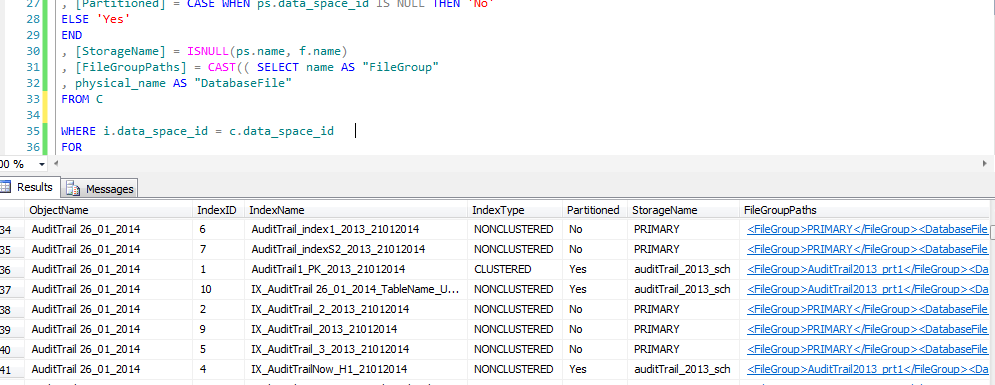
Hi guys today I will show smoothing is easy but more important to know about it {Where is the index live} by the below DMV we can return all the index with table name and with File group hosted on it , another thing you can use this DMV to know the heap tables , Clustered index , non-Clustered index

Index Location:

WITH C AS
(

SELECT ps.data_space_id
, f.name
, d.physical_name
FROM sys.filegroups f
JOIN sys.database_files d ON d.data_space_id = f.data_space_id
JOIN sys.destination_data_spaces dds ON dds.data_space_id = f.data_space_id
JOIN sys.partition_schemes ps ON ps.data_space_id = dds.partition_scheme_id

UNION

SELECT f.data_space_id
, f.name
, d.physical_name
FROM sys.filegroups f
JOIN sys.database_files d ON d.data_space_id = f.data_space_id
)
–SELECT * FROM c
SELECT [ObjectName] = OBJECT_NAME(i.[object_id])
, [IndexID] = i.[index_id]
, [IndexName] = i.[name]
, [IndexType] = i.[type_desc]
, [Partitioned] = CASE WHEN ps.data_space_id IS NULL THEN ‘No’
ELSE ‘Yes’
END
, [StorageName] = ISNULL(ps.name, f.name)
, [FileGroupPaths] = CAST(( SELECT name AS “FileGroup”
, physical_name AS “DatabaseFile”
FROM C

WHERE i.data_space_id = c.data_space_id
FOR
XML PATH(”)
) AS XML)
FROM [sys].[indexes] i
LEFT JOIN sys.partition_schemes ps ON ps.data_space_id = i.data_space_id
LEFT JOIN sys.filegroups f ON f.data_space_id = i.data_space_id
WHERE OBJECTPROPERTY(i.[object_id], ‘IsUserTable’) = 1
ORDER BY [ObjectName], [IndexName]

index

Follow me because next post I will explain everything about the index and How you can build you index model How you can Enhance your expensive query by index more Secrets in the index …ETC