the use of “SET NOCOUNT ON;” in SQL Server?


This statement is used to stop the message that shows the count of the number of rows affected by the SQL statement written in the stored procedure or directly SQL Statement

When it is ON - the number of affected rows will not be returned 
When it is OFF - the number of affected rows will be returned

Example 


USE AdventureWorks2012;
GO
SET NOCOUNT OFF;
GO
-- Display the count message. The number of affected rows will be returned 
SELECT TOP(5)LastName
FROM Person.Person
WHERE LastName LIKE 'A%';
GO
-- Disable the Count massage Then Number of affected rows will not be returned.
SET NOCOUNT ON;
GO
SELECT TOP(5) LastName
FROM Person.Person
WHERE LastName LIKE 'A%';
GO
-- Reset SET NOCOUNT to OFF
SET NOCOUNT OFF;
GO

Thanks for All

Eng. Mustafa Elmasry

MSSQL DBA


How to Change the Default Database Location


Problem :

After I Create Cluster and I make 2 Share Disk one for Data and the another for Logs I forget to Customize the location For the database What can I do to Change this Location ?

Salutation : 

You have two ways the first by T-SQL and the Second is Wizard Steps :

First Way:

A- Change the Default location for data file :

EXEC xp_instance_regwrite

N’HKEY_LOCAL_MACHINE’,

N’Software\Microsoft\MSSQLServer\MSSQLServer’,

N’DefaultData’,

REG_SZ

,N’F:\MSSQL10_50.MSSQLSERVER\MSSQL\DATA’

GO

B- Change the Default location for Logs file :

EXEC xp_instance_regwrite

N’HKEY_LOCAL_MACHINE’,

N’Software\Microsoft\MSSQLServer\MSSQLServer’,

N’DefaultLog’,

REG_SZ

,N’G:\MSSQL10_50.MSSQLSERVER\MSSQL\Log’

GO

Second Way:

Open the management Studio >>> Write Click on the Server >>> Select properties

Change1

Then Select Database Setting >>> you Will See Database Default Location

Change2

What is SQL Server events Captured in SQL Server transaction Logs


Q : Are all SQL Server events captured in the SQL Server Transaction Logs ?

A : The start and end of each transaction is saved in transaction logs

– Every data modification (insert, update, or delete). This includes changes by system stored procedures or data definition language (DDL) statements to any table, including system tables .

– Every extent and page allocation or deallocation .

– Creating or dropping a table or index.

– Rollback operations .

– Transaction SID .


How to install Adventure Work Database


Problem :

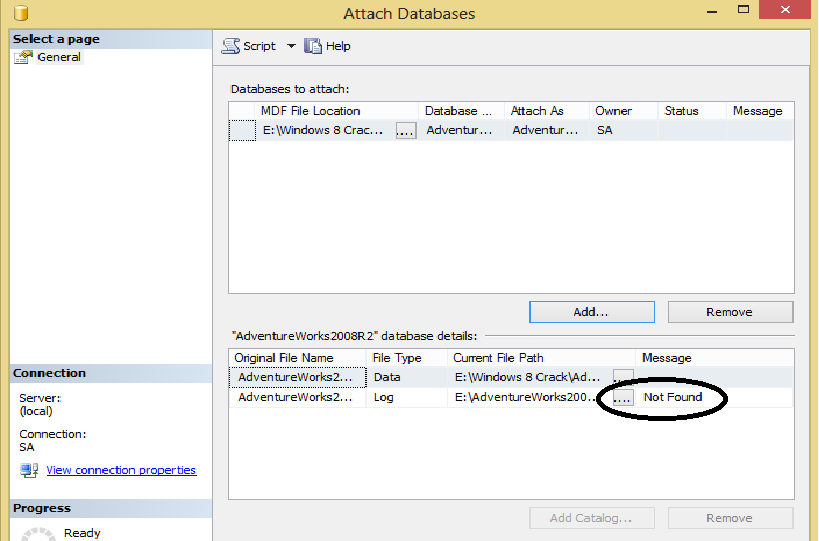
When I download Database Adventure Work  I see it MDF file only ok but now how can I attach this database without LDF file . SQL Server give me ERROR

AdventureWork Without LDF File


ERROR


Solution : 

to fix this error and install the database on the production we will create the LDF file by this script .


Create Database AdventureWorks2008R2

ON (FILENAME=‘E:\AdventureWorks2008R2_Data.mdf’)

FOR ATTACH_REBUILD_LOG

by this Script I Create Database AdventureWorks2008R2 and put the File name for the MDF file the ( Full path ) then I make REBUILD for the LOG by this Command  (ATTACH_REBUILD_LOG)

Now after you EXCE this Query Check the path of the MDF file you will see the new File LDF for the database adventure work also you check the Databases on SQL Server management studio you will find the Database ADVENTUREWORK2008R2

Regards ,

Eng. Mustafa Elmasry

Database Administrator