Steps for Creating System Stored Procedure In SQL Server 2008 R2


In our previous discussion, we have discussed about transaction log corruption and backup in SQL Server. Now, in this article we will know the steps for creating system stored procedure in SQL Server 2008 R2.

Organizations where SQL Server system is used for database storage and maintenance, projects with 1000s of database tables and stored procedures are common to find. Adding even a single parameter to an existing stored procedure can straightaway put an impact on a large number of other stored procedures or database tables as they are called from them. Moreover, Continue reading “Steps for Creating System Stored Procedure In SQL Server 2008 R2”

SQL Server 2012 NUMA Node Imbalance – Cont’d


Yesterday, I had posted an issue I been troubleshooting with memory allocation.  That was causing CPU to pin, you can read more about the issue at SQL Server 2012 NUMA Node Imbalance.  Even though I found what was causing it, I didn’t understand the internals well enough to identify the root cause.

Additional testing I discovered this issue is repro on Windows 2008 R2 Server with SQL Server 2012.  It does not seem to fixed that at 4000MB the issue will start; if server is busy, then it can start at a higher value.  In my re-pro test, I found it starting at even 6000MB.

As I said the up front memory allocation and management was contributing to this, however now I am unsure if Locked Pages in Memory is to contribute to this.

However, further insight I learned today.  If this issue exists, you might have Lazy Writer spinning continuously on the effected NUMA node.

Therefore if you execute following T-SQL:

select session_id, wait_type, wait_time, cpu_time, scheduler_id
  from sys.dm_exec_requests
where command = ‘lazy writer’
order by scheduler_id

Look at the output generated, if your Lazy Writer thread is working as normal (aka, only wakes up sometimes) you should see something similar to following:

clip_image002

However if you have this issue the Lazy Writer might look like below:

clip_image002[4]

  • Notice the wait_type has gone to NULL.
  • Notice wait_time has gone to 0 – signal it is not going to sleep like the rest.
  • Notice cpu_time keeps climbing.

Only work around that I know for this currently is, increase the max memory until you see lazy writer stop spinning and processor utilization starts dropping.

SQL Server 2012 NUMA Node Imbalance


One of my client has been fighting a very strange problem and there is not much literature on the topic, NUMA Node Imbalance.

Server Configuration

  • 8 NUMA nodes with 6 cores each; totaling 48 cores.
  • 256GB memory.
  • 12 Instances of SQL Server; mix of SQL Sever 2012 Latest Build and SQL Server 2008 R2 SP2.
    Issue
    NUMA node 0 pinned to 100% when all 12 instances are set to automatic CPU affinity setting.  This is recommended as default, there have been very few cases where I have had to consider changing this.  Generally default is fine, the SQL Server internal engine (or SQLOS)’s scheduler handle is very efficient at distributing load.  So why do we have it that NUMA node 0 was pinned?
    Initial Troubleshooting

Any time we have performance problem on a server that is running SQL Sever instances; my first question to ask is, is it really SQL Sever? Looking at task manager or resource governor, both show highest CPU utilization of under 5%.  This is not surprising, as the CPU in both of these tools provides an average over all CPUs.  Therefore there is no easy way to know which instances were causing the NUMA Node 0 on the server to pin.  There is nothing obvious that is also visible if I filter through the DMV/DMFs with in each instance.

However due to performance issues, my client decided to manually distribute the load across the 8 NUMA nodes by using CPU affinity mask setting.  And sure enough load on NUMA node 0 went down; however he only did it for subset of the instances.  So load decreased from 100% to about 70%.

Research and Investigation

While doing investigation, I only found two KB articles that talk about NUMA node performance issue on SQL Server 2012, KB2819662 and KB2926223. However, all the SQL Server 2012 instances are on latest build; therefore, these hot fixes did not apply.  I also found KB relating to operating system and NUMA processor pressure issues, however all turned out to be not the issue here.  Because even operating system was fully patched.

In order to troubleshoot what is causing CPU pressure issue on NUMA node 0, we decided to move all instances off NUMA node 0 by using CPU affinity mask setting.  In doing so we eventually found instances that was causing the load.  There were 6 instances that were contributing the load.

After investigating we found, locked pages in memory is enabled by default on each instance and found all affected instances had their maximum set to 4000MB.  I remember reading it is no recommended to have maximum memory set to such a low value.  Therefore, we increased it to 6000MB.  Doing so instantly caused the CPU on NUMA node 0 to return to nominal levels.

Details

MaxMemory_at_4GB

Memory settings on SQLInstance01

CPUAffinity_At_Node5

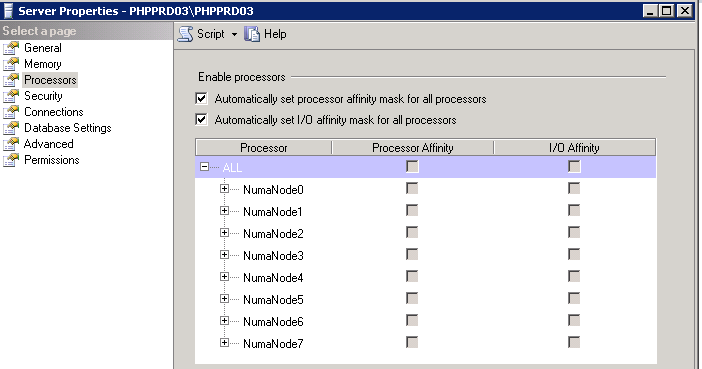
Processor Affinity Mask Setting – Set to NumaNode03 for SQLInstance01

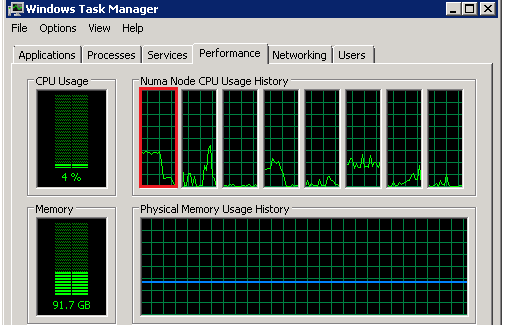
Above is an example of SQLInstance01, set to 4000MB with processor affinity set to NumaNode03.  If I look at the CPU now, there is no issues as in screenshot below.  However load is not running on NUMA node 0 right now.
CPU_LoadBefore_Rebalance

CPU Load on NUMA Node 0 (highlighted in red) – Nominal
CPUAffinity_At_Auto

Processor Affinity Mask Setting – Set to Default for SQLInstance01

Now if I change the instance to use all NUMA nodes, as per the default configuration, as in screenshot above.  Processors on NUMA node 0 start to pick up again. Notice the change was almost instantaneously.  Since I only did it for one instance it did not cause processor to pin to 100%; however hovered around 40% constant.  Imagine that times 6 instances, no wonder NUMA node 0 was pinned to 100%.

CPU_LoadAfter_Rebalance

CPU Load on NUMA Node 0 (highlighted in red) – After Affinity Set to Auto in SQL Server

Now if I adjust the max memory setting to 8000MB (I tested it with 6000MB); both settings, processor returned to normal performance; as per the screenshots below.

MaxMemory_at_8GB

Memory setting on SQLInstance01 – Setting it to 8000MB

CPU_LoadAfter_Rebalance_MemoryUpdate

CPU Load on NUMA Node 0 (highlighted in red) – After setting the Memory to > 4000MB

Summary

If you are using 64-bit of SQL Server (which is all version now) and have locked pages in memory enabled.  Be careful in setting the maximum memory value to a low value.  Because of locked pages in memory additional work needs to be done by SQL Server to manage the memory and from looks of it all this work is happening on NUMA node 0.  I do not know if this is by design.  However setting the memory to value higher then or equal to 6000MB resolved this issue.

I’ll follow up on this if I have any updates, as I’ll be raising the issue internally also.

This post is cross posted on my SQLCAN Blog, MSDN Blog, and SQL server Consultation blog.

Cannot add new node in SQL Server 2014


Problem 

Hi my followers today i have task to build two new SQL Server Clusters when i am working i go to for adding new Node at this time i revived very new issue for me Rule “SQL Server Database Services feature state” failed

—————————
Rule Check Result
—————————
Rule “SQL Server Database Services feature state” failed. The SQL Server Database Services feature failed when it was initially installed. The feature must be removed before the current scenario can proceed.
—————————
OK
—————————

This error meaning When you are adding the first node the cluster installed with some issues and this relay what is happened with me when i installed the First node i faced some issues so based on that adding second node is blocked

How i can fix this issue :

  • To fix this issue at the first you should check the Cluster error log in the first node and try to do prepare for this node

If this step not success with you to fix this issue you can try the second solution :

  1. Go for the Run
  2. Write Regedit
  3. Go for this path (HKEY_LOCAL_MACHINE\SOFTWARE\Microsoft\Microsoft SQLServer\MSSQL12.MSSQLSERVER2014\ConfigurationState )
  4. Check all the value for all the Component if you found the value is 2 this meaning you have failures in this Component change it to 1

Component name :

MPT_AGENT_CORE_CNI, SQL_Engine_Core_Inst, SQL_FullText_Adv, SQL_Replication_Core_Inst

Note : to find the correct place in the registry you  after this path (HKEY_LOCAL_MACHINE\SOFTWARE\Microsoft\Microsoft SQLServer\) we have to know Our SQL Server Version and SQL Server instance name

  • SQL Server 2008     : MSSQL10.      (InstanceName)
  • SQL Server 2008R2 : MSSQL10_50. (InstanceName)
  • SQL Server 2012     : MSSQL11 .     (InstanceName)
  • SQL Server 2014     : MSSQL12.      (InstanceName)

I hope the issue and How to fix the issue is clear

Follow Us :

LinkedIn Slideshare ,Youtube Channel.MSDN POSTS , WHO WE ARE

← Back

Thank you for your response. ✨

An Abstract On SQL Server Backup


overview

SQL Server application is integrated with several High-Availability elucidations like Fail-over clustering, Database mirroring, or Always-on. These solutions make sure that the databases are available for maximum up time. However, in order to make sure that the databases are not lost or there is no data loss with any type of failure, users can create SQL Server backups. This segment will discuss about the backup and restore strategies and methodologies of the same.

Various Types of SQL Server Backup

  • Full backups
  • Differential backups
  • Transaction log backups

Full Backups

This type of backup is the most common type of backup, and is known as database backup. It comprises the backup of databases along with part of the transactional log files. It provides simplest forms of database “backup and restore” method. This backup can be taken using T-SQL or SQL Server Management Studio. Continue reading “An Abstract On SQL Server Backup”