
Microsoft announced SQL Server 2016


Very Amazing technology didn’t Stop 
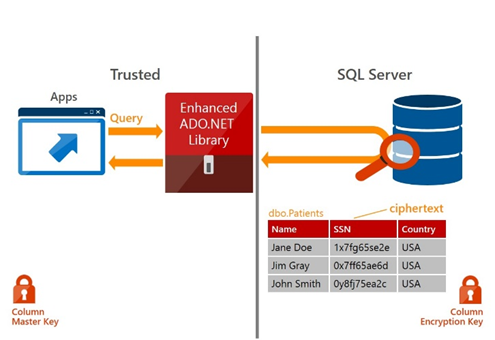
dpi-may4-1Satya Nadella, CEO of Microsoft, announced SQL Server 2016, an intelligent platform for a mobile first, cloud first world.  The next major release of Microsoft’s flagship database and analytics platform provides breakthrough performance for mission critical applications and deeper insights on your data across on-premises and cloud. Top capabilities for the release include: Always Encrypted – a new capability that protects data at rest and in motion, Stretch Database – new technology that lets you dynamically stretch your warm and cold transactional data to Microsoft Azure, enhancements to our industry-leading in-memory technologies for real-time analytics on top of breakthrough transactional performance and new in-database analytics with R integration.

For More information go here

To check all my posts you can direct to my personal website or you can download this Excel sheet My Technical POSTS

View all my tips , LinkedIn Slideshare ,Youtube Channel.

SQL Server 2014 Health check DMV queries Day 7


 Hi guys in the Previous post i explained three DMV related to SQL Server cluster and  AlwaysOn AG, Get information about your OS cluster , Cluster Node Properties and Failover Cluster Node with AlwaysOn AG put today in DAY 7 i will show new DMV in our track Instance Level configuration .

DMV#17 Instance Configuration Properties

now we can know easily all the instance configuration properties like (backup compression, Ad Hoc Distributed Queries,affinity I/O mask,max server memory (MB) and max degree of parallelism…etc

SELECT name, value, value_in_use, minimum, maximum, [description], is_dynamic, is_advanced
FROM sys.configurations WITH (NOLOCK)
ORDER BY name OPTION (RECOMPILE);

DMV#17

Continue reading “SQL Server 2014 Health check DMV queries Day 7”

SQL Server 2014 Health check DMV queries Day 6


Hi guys in the Previous post i explained How we can Getting the Server Model Number ,Getting the Processor Description  and get SQL Server Error Log Properties put today in DAY 6 i will show new DMV in our track Instance Level configuration .

in this post i will explain three new DMV related to SQL Server Cluster and AlwaysOn AG You will see no results if your instance is not using Clustering or AlwaysOn AG.

DMV#14 Get information about your OS cluster

If your SQL server is cluster not standalone you can use this DMV to get very useful information about the OS (Operation System)

SELECT VerboseLogging, SqlDumperDumpFlags, SqlDumperDumpPath,
 SqlDumperDumpTimeOut, FailureConditionLevel, HealthCheckTimeout
FROM sys.dm_os_cluster_properties WITH (NOLOCK) OPTION (RECOMPILE);

DMV#15 Cluster Node Properties

by this DMV we can return the node name and the current status of it so know you can now easily SQL Server cluster running in which node .

SELECT NodeName, status_description, is_current_owner
FROM sys.dm_os_cluster_nodes WITH (NOLOCK) OPTION (RECOMPILE);

DMV#16 Failover Cluster Node with AlwaysOn AG

by this DMV you can return the Cluster name , quorum_type_desc  and  quorum_state_desc for SQL Server AlwaysOn

SELECT cluster_name, quorum_type_desc, quorum_state_desc
FROM sys.dm_hadr_cluster WITH (NOLOCK) OPTION (RECOMPILE);

To check all my posts you can direct to my personal website or you can download this Excel sheet My Technical POSTS

View all my tips , LinkedIn Slideshare ,Youtube Channel.

My First Arabic post on Microsoft MSDN in SQL Server 2014


Hello Guys this my First Arabic post on Microsoft MSDN in SQL Server 2014 in very important subject Durable vs. Non-durable tables: In-Memory OLTP 

All My Arabic Posts :

تكنولوجيا الجداول الدائمه والغير دائمه Microsoft SQL Server 2014

الصلاحيات الجديده فى محرك قواعد بيانات مايكروسوفت 2014

أهم بعض الأكواد الديناميكيه المستخدمه فى محرك قواعد بيانات مايكروسوفت 2014

الأكواد الديناميكية لمراقبة ومتابعة حلول تزامن البيانات 1/ 3

الأكواد الديناميكية لمراقبة ومتابعة حلول تزامن البيانات 2/ 3

الأكواد الديناميكية لمراقبة ومتابعة حلول تزامن البيانات 3/ 3

أكواد الفحص الدورى والتشخيص الديناميكيه لمحرك قواعد بيانات مايكروسوفت 2014 الجزء 1

تكنولوجيا الجداول الدائمه والغير دائمه Microsoft SQL Server 2014

Follow ME

View all my tips , LinkedIn Website Slideshare ,Youtube Channel

SQL Server 2014 Health check DMV queries Day 5


Hi guys in the Previous post i explained How we can get the SQL Server NUME Information and How to get Hardware Information  put today in DAY 5 i will show new DMV in our track Instance Level configuration .

DMV#11 Getting the Server Model Number

by the below DMV we can know the capacities of database System Manufacturer

EXEC xp_readerrorlog 0, 1, "Manufacturer";

DMV#11

DMV12# Getting the Processor Description

You should know the type of the Processor  of your Windows Server that the SQL Server instance Hosted on it based on that check the DMV

Continue reading “SQL Server 2014 Health check DMV queries Day 5”