
you can watch the 1st video record of the 1st SQL Saturday Event in the middle east at

you can watch the 1st video record of the 1st SQL Saturday Event in the middle east at
Question : Choose the wrong Answer
When We Create primary key on Table :
1- it Always Create ” Clustered index ”
2- It Always Create ” Non Clustered index ”
3- It Always Create ” Clustered and Non Clustered index ”
Answer :
The Wrong answer in number 3 primary key create one index on table (Clustered or Non Clustered ) Automatically .
When we created Primary key on any table this primary key Check the Table if this table have Non Clustered Index Automatic Create Clustered index Else if the table have Clustered index primary key Automatic Create Non Clustered index
Demo :
1- CREATE TABLE
Create table Table_primaryKey
(
Pkey_ID int Not Null,
Pkey_name Nvarchar(50) ,
Pkey_Lsn bigint
)
2- Check Index type on Table Name ” Table_PrimaryKey ”
after the result Show we will check the Column Name ” typ_desc ” to know the type of the indexes on this table .
Note : Typ_desc = HEAP ( Meaning this Table not have ” CLUSTERED INDEX ” .
A- Check the index on table by Script
SELECT obj.name,
ind.name,
ISNULL(INDEXPROPERTY(OBJECT_ID(obj.name),ind.name,’IndexFillFactor’),0) [fill_factor],
create_date, modify_date, ind.type_desc,
fill_factor, has_filter,
ISNULL(INDEXPROPERTY(OBJECT_ID(obj.name),ind.name,’IndexDepth’),0) [IndexDepth],
ISNULL(INDEXPROPERTY(OBJECT_ID(obj.name),ind.name,’IsAutoStatistics’),0) [IsAutoStatistics],
ISNULL(INDEXPROPERTY(OBJECT_ID(obj.name),ind.name,’IsStatistics’),0) [IsStatistics],
ISNULL(INDEXPROPERTY(OBJECT_ID(obj.name),ind.name,’IsUnique’),0) [IsUnique],
ISNULL(INDEXPROPERTY(OBJECT_ID(obj.name),ind.name,’IsClustered’),0) [IsClustered]
FROM sys.objects obj
INNER JOIN sys.indexes ind
ON obj.object_id = ind.object_id
WHERE obj.type = ‘U’
and obj.name = ‘Table_primaryKey’
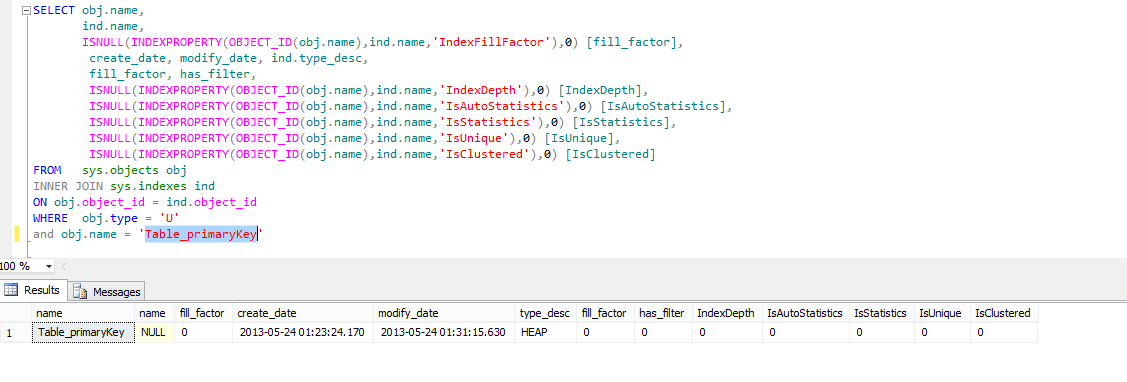
now we see the result is HEAP So we don’t have any clustered index or Non Clustered index also because the result not show any thing expected the HEAP
B -Check index table from SQL Server Management Studio
Check Database >> Tables >> Indexes – you will not found any index
3- Create Primary Key
ALTER TABLE Table_primaryKey
ADD CONSTRAINT [PK_Table_primaryKey_Pkey_ID]
PRIMARY KEY (Pkey_ID ASC
)
GO
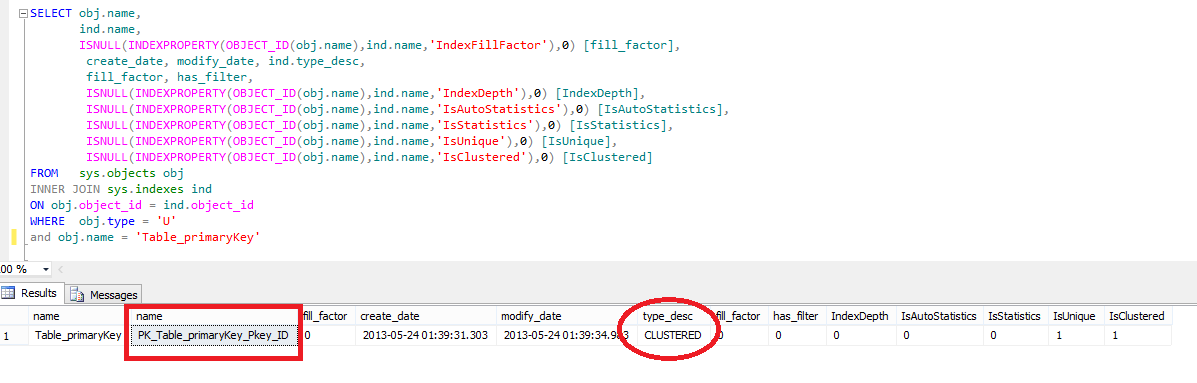
Primary key will Create Automatic Clustered index ” PK_Table_primaryKey_Pkey_ID ” on the table
4- Drop the Primary Key
ALTER TABLE Table_primaryKey
DROP CONSTRAINT [PK_Table_primaryKey_Pkey_ID]
GO
Now the Clustered index Dropped
Check Database >> Tables >> Indexes – No indexes
5- Create Clustered Index
CREATE CLUSTERED INDEX
[CL_Table_primaryKey_Pkey_ID] ON Table_primaryKey
( Pkey_ID ASC)
GO
Check Database >> Tables >> Indexes – Index Name (CL_Table_primaryKey_Pkey_ID) Clustered Index
6- Create Primary Kay again (Check point No 3 )
Check Database >> Tables >> Indexes – PK_Table_primaryKey_Pkey_ID (NONCLUSTERED)

Now we now if the table have Clustered iindex and you create Primary key it will Create automatic Non-clustered Index
7- drop the primary key again (check point No 4)
Check Database >> Tables >> Indexes – Index Name PK_Table_primaryKey_Pkey_ID (NONCLUSTERED) DELETED
8- Create Non-Clustered Index
9- Create primary Key
Check Database >> Tables >> Indexes -you will find New Non Clustered index now we have 2 Non-Clustered Index
10- drop All index in table
Check Database >> Tables >> Indexes >>> Delete one by one
11 -drop the primary key again (check point No 4)
Note : Now i i Create New primary key it will Create Automatic New Clustered Index but if you need to Create Primary Key With Non-Clustered index .
12- Create Primary Key With Non-Clustered Index
ALTER TABLE Table_primaryKey
ADD CONSTRAINT [PK_Table_primaryKey_Pkey_ID]
PRIMARY KEY NONCLUSTERED (Pkey_ID ASC
)
GO
13 – Check the index on Table
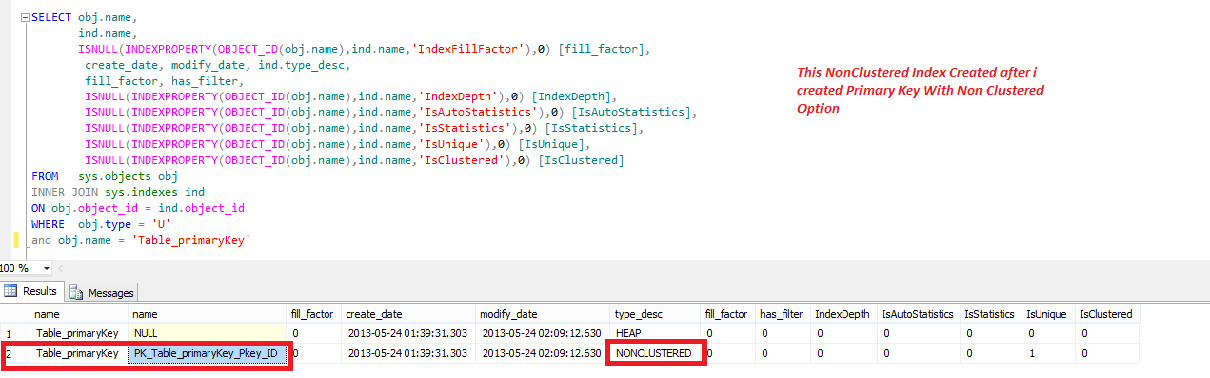
Primary Key Can Create Non-Clustered Index When we don’t have Clustered index in on Table .
I Wish Success To Everyone
Eng. Mostafa Elmasry
Database Administrator
With SORT_IN_TEMPDB = ON
This option can improve your Index to be more Performance but you must take care about this Size of the TempDB
— Create some indexes
CREATE UNIQUE CLUSTERED INDEX [Clustered_SalesOrderDetails]
ON [Sales].[SalesOrderDetail]
([SalesOrderDetailID] ASC)
WITH (SORT_IN_TEMPDB = ON)
GO
you can use this DMV Script to Show Index information in your database
SELECT obj.name,
ind.name,
ISNULL(INDEXPROPERTY(OBJECT_ID(obj.name),ind.name,’IndexFillFactor’),0) [fill_factor],
create_date, modify_date, ind.type_desc,
fill_factor, has_filter,
ISNULL(INDEXPROPERTY(OBJECT_ID(obj.name),ind.name,’IndexDepth’),0) [IndexDepth],
ISNULL(INDEXPROPERTY(OBJECT_ID(obj.name),ind.name,’IsAutoStatistics’),0) [IsAutoStatistics],
ISNULL(INDEXPROPERTY(OBJECT_ID(obj.name),ind.name,’IsStatistics’),0) [IsStatistics],
ISNULL(INDEXPROPERTY(OBJECT_ID(obj.name),ind.name,’IsUnique’),0) [IsUnique],
ISNULL(INDEXPROPERTY(OBJECT_ID(obj.name),ind.name,’IsClustered’),0) [IsClustered]
FROM sys.objects obj
INNER JOIN sys.indexes ind
ON obj.object_id = ind.object_id
WHERE obj.type = ‘U’
—and obj.name = ‘Computed_Cal’ —where you need to Show index info in Specfice table
–And ind.type_desc = ‘Heap’ — Where you need the Tables not have any Indexes
Now if i need to Make Auditing in my SQL Server production to know any thing happens in my SQL Server We have 3 Ways :
1- We can Use third party tool like this one for free
http://www.toadworld.com/KNOWLEDGE/ToadKnowledge/TipsandTricks/tabid/74/TID/303/cid/38/Default.aspx
2- use SQl Server Report to Audit your SQL Server . it Will give you Summary about the Object Changed like Create , Drop , Alter .
3- Use SQL Server Audit Feature . Under Security in SQL Server SSMS . it can give you any info you need to know it.
I will Explain today the How to check the History of all Committed DDL Statement by SQL Server Reports.
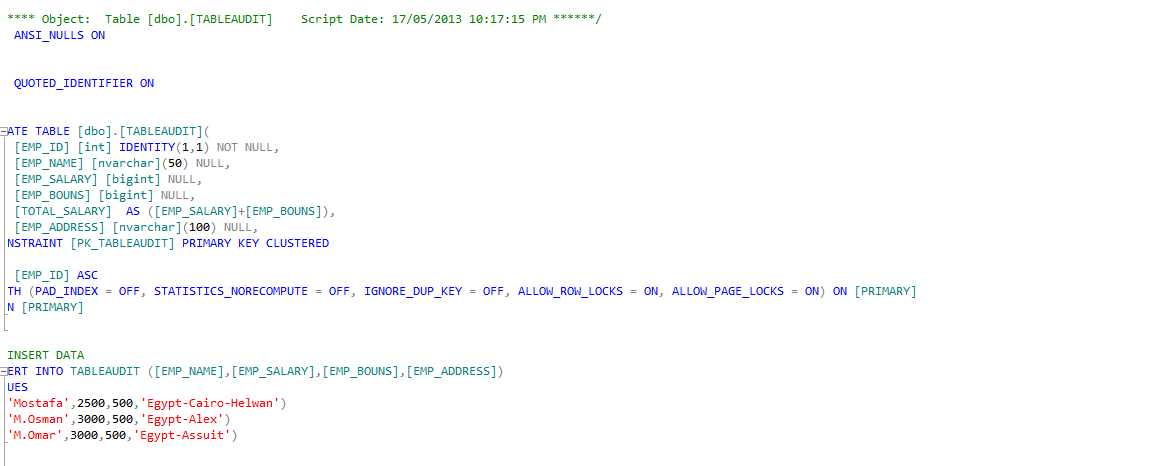
in the first i will create table to Explain my Examples on it
Create Database Audit
go
use Audit
GO
SET ANSI_NULLS ON
GO
SET QUOTED_IDENTIFIER ON
GO
CREATE TABLE [dbo].[TABLEAUDIT](
[EMP_ID] [int] IDENTITY(1,1) NOT NULL,
[EMP_NAME] [nvarchar](50) NULL,
[EMP_SALARY] [bigint] NULL,
[EMP_BOUNS] [bigint] NULL,
[TOTAL_SALARY] AS ([EMP_SALARY]+[EMP_BOUNS]),
[EMP_ADDRESS] [nvarchar](100) NULL,
CONSTRAINT [PK_TABLEAUDIT] PRIMARY KEY CLUSTERED
(
[EMP_ID] ASC
)WITH (PAD_INDEX = OFF, STATISTICS_NORECOMPUTE = OFF, IGNORE_DUP_KEY = OFF, ALLOW_ROW_LOCKS = ON, ALLOW_PAGE_LOCKS = ON) ON [PRIMARY]
) ON [PRIMARY]
GO
then now i will insert Data :
—INSERT DATA
INSERT INTO TABLEAUDIT ([EMP_NAME],[EMP_SALARY],[EMP_BOUNS],[EMP_ADDRESS])
VALUES
(‘Mostafa’,2500,500,’Egypt-Cairo-Helwan’)
, (‘M.Osman’,3000,500,’Egypt-Alex’)
, (‘M.Omar’,3000,500,’Egypt-Assuit’)
SQL Server Reports to Audit your SQL production :
1- Schema Changes History Reports
Open SSMS >>> Database Audit >>>> Right Click on it >>>> Reports >>>> Stander Reports >>>> Schema Changes History Report .
you will see the Changes happens in database Audit but only in the Create and Alter and if you make and Drop to Column , table , View Like this you can reviwe it by the time and How make this action from this report on this database

also you can check any changes happens in your server on all database_user by this steps :
Open SSMS >>>> Connect to your instance you need to make audit on it >>>> right click on your server name >>>> Reports >>>> Stander Reports >>>> Schema Changes History report .

so now we can know a history of all Committed DDL Statement Executions Recorded. but not give us all info like the DML Statement Executions.
 DB Cloud TECH