Why I should upgrade to SQL Server 2019


Why I should upgrade to SQL Server 2019 even if I will not use the big features on it (Big Data Cluster) AS all of us know SQL Server 2019 is the latest SQL Server version and it come up with very sophisticated and impressed enhancements.

The most interested features is Big Data Clusters and How SQL Server now are able to integrated with other database and open sources and How SQL Server are now working and supporting all of the new technologies in the market like ( Spark, Hadoop, HDFS, Python, Docker, Kubernetes, machine learning, Kafka, NoSQL  ..etc)

Continue reading “Why I should upgrade to SQL Server 2019”

How to Upgrade to SQL Server 2017


One of the tasks that any DBA now can be asked to upgrade the production environment to the latest SQL Server version . and this task is more critical you can find below some tips and resources that can be helpful on this tasks

  1. How to decide on an upgrade
  • SQL Server 2000 and SQL Server 2005 are no longer supported by Microsoft and no updates are published. This lack of support means your databases may be vulnerable to security attacks that have been addressed by recent upgrades. Upgrade these database servers unless you can afford to lose them or allow the data they contain to fall into malicious hands.
  • Because these databases are no longer supported, it is highly likely that you are not in compliance with the data protection laws in your region.
  • Your company already uses Azure for other systems and may wish to migrate databases into Azure as well. You cannot migrate a database into Azure SQL Database from SQL Server 2000 or 2005.
  • You can upgrade a SQL Server 2005 database server to SQL Server 2017 directly. However, to upgrade from SQL Server 2000, you must first upgrade to SQL Server 2008.
  1. Discover your DB and Document anything (versions, features, editions , DB Size , DB Count , Configuration component, ..etc ) you can use (Microsoft Assessment and Planning (MAP) toolkit) in this part
  2. Data Migration Assistant (DMA) : supports versions of SQL Server from 2005 upwards. Using the assistant, you connect to the instance and select the database you plan to upgrade. You tell the assistant the target version of SQL Server and it will analyze the size and schema of the database. It will also make recommendations for your upgrade. After the analysis, DMA provides a compatibility report, which highlights breaking changes, behavioral changes, and deprecated features so these problems can be fixed.
  3. Database Experimentation Assistant (DEA) : To test your migration and upgrade process to test the DB performance and workload if we upgraded it You can also test performance on different hardware or with new features added

Introduction to upgrading SQL Server

Microsoft Assessment and Planning Toolkit MAP :

MicrosoftĀ® Data Migration Assistant DMA :

MicrosoftĀ® Database Experimentation Assistant DEA :

Create SQL Server HA and DR using FCI and AOAG


One of the most tricky subject for any SQL Server DBA or SQL server consultant How to build HA ( High Availability ) it is not something Complex, but it need to be list down all of the points and the requirements before going for this project and when we talk about High Availability We should consider two technology FCI (SQL Server Failover Cluster) and AOAG (Always on High Availability Group) both technologies will give you the same feature ( High Availability ) to save your DB from any disaster  can be happened in your DB center , As you know AOAG is new technology released with SQL Server 2012 and Microsoft added more features on it in SQL Server 2016, 2017 and 2019 as well . So really I recommend it for HA solution. Also, it will give you the availability to split your transaction between multiple instance one as RW (Read-write) it is called Primary, and the other instance will work as R (Read only), and it is called secondary server.

Now I leave you with the training video to know How you can build SQL Server HA and DR using FCI and AOAG


Training video published by Mr. Musab Umair  Microsoft SQL Server DB Consultant you can follow him on his LinkedIn account (https://www.linkedin.com/in/musabumair/)

Keep following our community to know all of the new technologies and features in SQL Server

SQL Server 2017 on Linux


Hello, followers, I need to share with you some tips in SQL Server 2017 on Linux

  • SQL Server 2017 supported Red Hat, SUSE and Ubuntu
  • You need 3.25 GB of memory to run SQL Server Enterprise on the Linux operating system
  • Not like Windows Server you can install multiple instances on the operation system, Linux supported only one SQL Server instance
  • Hostname of the SQL server should be less than 15 Characters
  • File System has a different configuration in Ubuntu and SUSE should be EXT4 but in Red Hat should be EXT4 and XFS Files.
  • Remote databases can’t be stored on NFS system
  • SQL Server Native GUI still not supported in Linux system till this moment
  • Cannot connect to the SQL instance on Linux from the management studio installed on Windows Server
  • The maintenance plan, Management Data Warehouse, distributed transactions, and the Data Collector are not supported in SQL Server /Linux
  • If you have SQL version less than 2017 and you need to migrate it to Linux , Recommended to upgrade it on Windows server to SQL 2017 than you can take backup from DB and restore it on Linux or Attach / De attach and in the restore DB from windows to Linux you need to use ā€œWITH MOVEā€ T-SQL statement
  • SQL Server 2017 unsupported feature on Linux (transactionalĀ replication, merge replication, stretch DB, polybase,Ā distributed queries with third-party connections,Ā system extended stored procedures, file tables, CLR assemblies with external access or unsafe permissionsĀ set, and buffer pool extensions. Database mirroring, agent alerts, managed backups, theĀ SQL Server browser and the machine learning services thatĀ include support for the R and Python programming languages,Ā are also not supported at the time of this recording)

I know this a lot features in SQL Server 2017 not supported in Linux but personally, I am so proud about this results it is the first time for Microsoft to see SQL Server on another operating system (Red Hat, SUSE or Ubuntu)

References :

https://docs.microsoft.com/en-us/sql/linux/sql-server-linux-release-notes?view=sql-server-2017

https://docs.microsoft.com/en-us/sql/linux/sql-server-linux-editions-and-components-2017?view=sql-server-2017

https://docs.microsoft.com/en-us/sql/linux/sql-server-linux-security-overview?view=sql-server-2017

https://www.theregister.co.uk/2017/09/27/sql_server_2017_whats_new_and_on_linux_whats_missing/


Methods of protection and recommendations from threats and dangers of a Ransomware virus


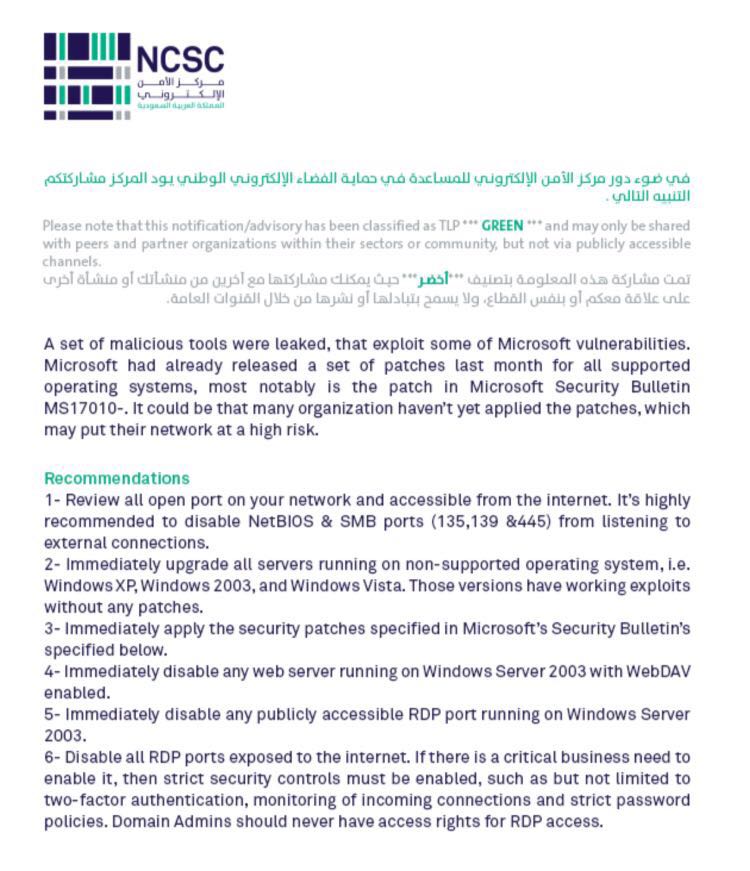
I would like to inform you that there are warnings and risks on our servers, Computers based on the statements published today in more than one website and published through (Microsoft, NCSC,..ETC) the emergence of Ransomware virus.

This virus attacked many of PC,s, and servers over all the world that’s why We need necessarily to do the below things ASAP


WhatsApp Image 2017-05-13 at 3.18.07 PM

Continue reading “Methods of protection and recommendations from threats and dangers of a Ransomware virus”