Important for All DBA , Developer SQL Server
1- How to Monitor Lock and block transaction
At the first we will do example on Lock , block transaction to test on it how to catch this bad transaction
Create Table Table1
(ID int , name Nvarchar(50))
go
Create Table Table2
(ID int , Adress Nvarchar(50))
go
–Insert Data
insert into Table1 values
(1,’Mostafa’)
GO
insert into Table2
Values (1,’Elmasry’)
- Open new window no 1 in SQL Server
BEGIN TRAN Insert_Data
INSERT INTO Table1(ID, Name)
VALUES (2, ‘Moahmed’)
- Open new Window No 2 in SQL Server
BEGIN TRAN
UPDATE Table2
SET ID = ‘3’
WHERE Name = ‘Moahmed’;
ROLLBACK TRAN
Now We have more ways I collect it to you this ways like:
- Stored procedure
- DMV (Dynamic management view)
- SQL Server Management Studio Activity Monitor
- SQL Server Management Studio Report
Stored procedure
Use master
go
Exec Sp_Who2
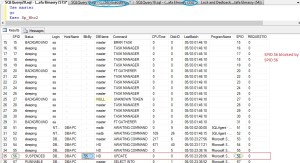
DMV (Dynamic management view)
–sys.dm_exec_requests
USE Master
GO
SELECT *
FROM sys.dm_exec_requests
WHERE blocking_session_id <> 0;
GO
–sys.dm_os_waiting_tasks
USE Master
GO
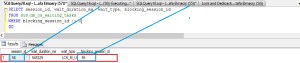
SELECT session_id, wait_duration_ms, wait_type, blocking_session_id
FROM sys.dm_os_waiting_tasks
WHERE blocking_session_id <> 0
GO
— Query for specific lock types
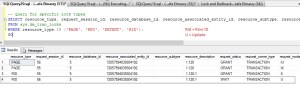
SELECT resource_type, request_session_id, resource_database_id, resource_associated_entity_id, resource_subtype, resource_description, request_status, request_owner_type, request_mode
FROM sys.dm_tran_locks
WHERE resource_type IN (‘PAGE’, ‘KEY’, ‘EXTENT’, ‘RID’);
GO
–sys.dm_tran_locks Join With sys.dm_os_waiting_tasks
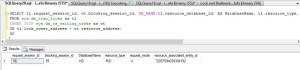
SELECT tl.request_session_id, wt.blocking_session_id, DB_NAME(tl.resource_database_id) AS DatabaseName, tl.resource_type, tl.request_mode, tl.resource_associated_entity_id
FROM sys.dm_tran_locks as tl
INNER JOIN sys.dm_os_waiting_tasks as wt
ON tl.lock_owner_address = wt.resource_address;
GO
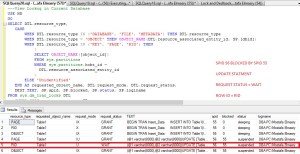
—View Lockng in Current Database
USE HD
GO
SELECT DTL.resource_type,
CASE
WHEN DTL.resource_type IN (‘DATABASE’, ‘FILE’, ‘METADATA’) THEN DTL.resource_type
WHEN DTL.resource_type = ‘OBJECT’ THEN OBJECT_NAME(DTL.resource_associated_entity_id, SP.[dbid])
WHEN DTL.resource_type IN (‘KEY’, ‘PAGE’, ‘RID’) THEN
(
SELECT OBJECT_NAME([object_id])
FROM sys.partitions
WHERE sys.partitions.hobt_id =
DTL.resource_associated_entity_id
)
ELSE ‘Unidentified’
END AS requested_object_name, DTL.request_mode, DTL.request_status,
DEST.TEXT, SP.spid, SP.blocked, SP.status, SP.loginame
FROM sys.dm_tran_locks DTL
INNER JOIN sys.sysprocesses SP
ON DTL.request_session_id = SP.spid
–INNER JOIN sys.[dm_exec_requests] AS SDER ON SP.[spid] = [SDER].[session_id]
CROSS APPLY sys.dm_exec_sql_text(SP.sql_handle) AS DEST
WHERE SP.dbid = DB_ID()
AND DTL.[resource_type] <> ‘DATABASE’
ORDER BY DTL.[request_session_id];
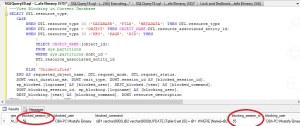
—View Blocking in Current Database
SELECT DTL.resource_type,
CASE
WHEN DTL.resource_type IN (‘DATABASE’, ‘FILE’, ‘METADATA’) THEN DTL.resource_type
WHEN DTL.resource_type = ‘OBJECT’ THEN OBJECT_NAME(DTL.resource_associated_entity_id)
WHEN DTL.resource_type IN (‘KEY’, ‘PAGE’, ‘RID’) THEN
(
SELECT OBJECT_NAME([object_id])
FROM sys.partitions
WHERE sys.partitions.hobt_id =
DTL.resource_associated_entity_id
)
ELSE ‘Unidentified’
END AS requested_object_name, DTL.request_mode, DTL.request_status,
DOWT.wait_duration_ms, DOWT.wait_type, DOWT.session_id AS [blocked_session_id],
sp_blocked.[loginame] AS [blocked_user], DEST_blocked.[text] AS [blocked_command],
DOWT.blocking_session_id, sp_blocking.[loginame] AS [blocking_user],
DEST_blocking.[text] AS [blocking_command], DOWT.resource_description
FROM sys.dm_tran_locks DTL
INNER JOIN sys.dm_os_waiting_tasks DOWT
ON DTL.lock_owner_address = DOWT.resource_address
INNER JOIN sys.sysprocesses sp_blocked
ON DOWT.[session_id] = sp_blocked.[spid]
INNER JOIN sys.sysprocesses sp_blocking
ON DOWT.[blocking_session_id] = sp_blocking.[spid]
CROSS APPLY sys.[dm_exec_sql_text](sp_blocked.[sql_handle]) AS DEST_blocked
CROSS APPLY sys.[dm_exec_sql_text](sp_blocking.[sql_handle]) AS DEST_blocking
WHERE DTL.[resource_database_id] = DB_ID()
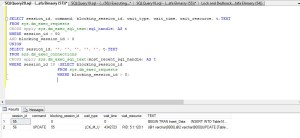
SELECT session_id, command, blocking_session_id, wait_type, wait_time, wait_resource, t.TEXT
FROM sys.dm_exec_requests
CROSS apply sys.dm_exec_sql_text(sql_handle) AS t
WHERE session_id > 50
AND blocking_session_id > 0
UNION
SELECT session_id, ”, ”, ”, ”, ”, t.TEXT
FROM sys.dm_exec_connections
CROSS apply sys.dm_exec_sql_text(most_recent_sql_handle) AS t
WHERE session_id IN (SELECT blocking_session_id
FROM sys.dm_exec_requests
WHERE blocking_session_id > 0)
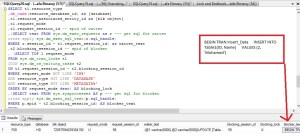
SELECT t1.resource_type
,db_name(resource_database_id) as [database]
,t1.resource_associated_entity_id as [blk object]
,t1.request_mode
,t1.request_session_id — spid of waiter
,(SELECT text FROM sys.dm_exec_requests as r — get sql for waiter
cross apply sys.dm_exec_sql_text(r.sql_handle)
WHERE r.session_id = t1.request_session_id) as waiter_text
,t2.blocking_session_id — spid of blocker
, (SELECT TOP 1 request_mode
FROM sys.dm_tran_locks t1
JOIN sys.dm_os_waiting_tasks t2
ON t1.request_session_id = t2.blocking_session_id
WHERE request_mode NOT LIKE ‘IX%’
AND resource_type NOT LIKE ‘DATABASE’
AND resource_type NOT LIKE ‘METADATA%’
ORDER BY request_mode desc) AS blocking_lock
,(SELECT text FROM sys.sysprocesses AS p — get sql for blocker
cross apply sys.dm_exec_sql_text(p.sql_handle)
WHERE p.spid = t2.blocking_session_id) AS blocker_text
FROM
sys.dm_tran_locks as t1,
sys.dm_os_waiting_tasks as t2
WHERE
t1.lock_owner_address = t2.resource_address
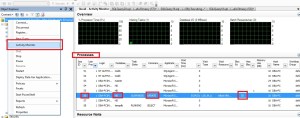
SQL Server management studio Active monitor.
Write Click on your Instance >>>> Active Monitor >>>> Processes .
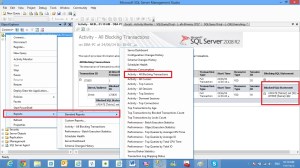
SQL Server Management Studio Reports .
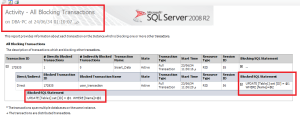
Write Click on your Instance >>> Reports >>> Standard Reports >>>> Activity – All blocking Transactions.
Fixing the Locking Issues
it isn’t as simple as just killing the connection that is causing the lock
KILL 56
Some common lock types are:
- RID – single row lock
- KEY – a range of keys in an index
- PAG – data or index page lock
- EXT – Extent Lock
- TAB – Table Lock
- DB – Database Lock
Some common lock modes are:
- S – Shared lock
- U – Update Lock
- X – Exclusive lock
- IS – Intent shared
- IU – Intent Update
- IX – Intent Exclusive
- BU – Bulk update
Thanks for All
Eng. Mustafa Elmasry
MSSQL DBA



 DB Cloud TECH