Why UNION ALL is faster than UNION?


Why UNION ALL is faster than UNION?

Manoj Pandey's avatarSQL with Manoj

UNION and UNION ALL are used to combine data or record sets from two different tables. One could combine more than 2 tables. Just like JOINS, UNION combines data into a single record-set but vertically by adding rows from another table. JOINS combine data horizontally by adding columns from another table.

UNION insures you get DISTINCT records from both the tables.
UNION ALL pulls out all records from both the tables with duplicates.

SQL Scripts below proves why UNION ALL is faster than UNION:

Comparison:

Query Plan for UNION:
  |--Sort(DISTINCT ORDER BY:([Union1008] ASC, [Union1009] ASC))
       |--Concatenation
            |--Table Scan(OBJECT:([tempdb].[dbo].[#tempTable1]))
            |--Table Scan(OBJECT:([tempdb].[dbo].[#tempTable2]))
Query Plan for UNION ALL:
  |--Concatenation
       |--Table Scan(OBJECT:([tempdb].[dbo].[#tempTable1]))
       |--Table Scan(OBJECT:([tempdb].[dbo].[#tempTable2]))
Query Plan for UNION ALL with DISTINCT:
  |--Concatenation
       |--Sort(DISTINCT ORDER BY:([tempdb].[dbo].[#tempTable1].[FirstName] ASC, [tempdb].[dbo].[#tempTable1].[LastName] ASC))
       |    |--Table Scan(OBJECT:([tempdb].[dbo].[#tempTable1]))
       |--Sort(DISTINCT ORDER BY:([tempdb].[dbo].[#tempTable2].[FirstName] ASC, [tempdb].[dbo].[#tempTable2].[LastName] ASC))
            |--Table Scan(OBJECT:([tempdb].[dbo].[#tempTable2]))

The Query plan for:
– UNION ALL SELECT above…

View original post 91 more words

How to Change the Default Database Location


Problem :

After I Create Cluster and I make 2 Share Disk one for Data and the another for Logs I forget to Customize the location For the database What can I do to Change this Location ?

Salutation : 

You have two ways the first by T-SQL and the Second is Wizard Steps :

First Way:

A- Change the Default location for data file :

EXEC xp_instance_regwrite

N’HKEY_LOCAL_MACHINE’,

N’Software\Microsoft\MSSQLServer\MSSQLServer’,

N’DefaultData’,

REG_SZ

,N’F:\MSSQL10_50.MSSQLSERVER\MSSQL\DATA’

GO

B- Change the Default location for Logs file :

EXEC xp_instance_regwrite

N’HKEY_LOCAL_MACHINE’,

N’Software\Microsoft\MSSQLServer\MSSQLServer’,

N’DefaultLog’,

REG_SZ

,N’G:\MSSQL10_50.MSSQLSERVER\MSSQL\Log’

GO

Second Way:

Open the management Studio >>> Write Click on the Server >>> Select properties

Change1

Then Select Database Setting >>> you Will See Database Default Location

Change2

Cluster Firewall issue – An item with the same key has already been added


Problem :

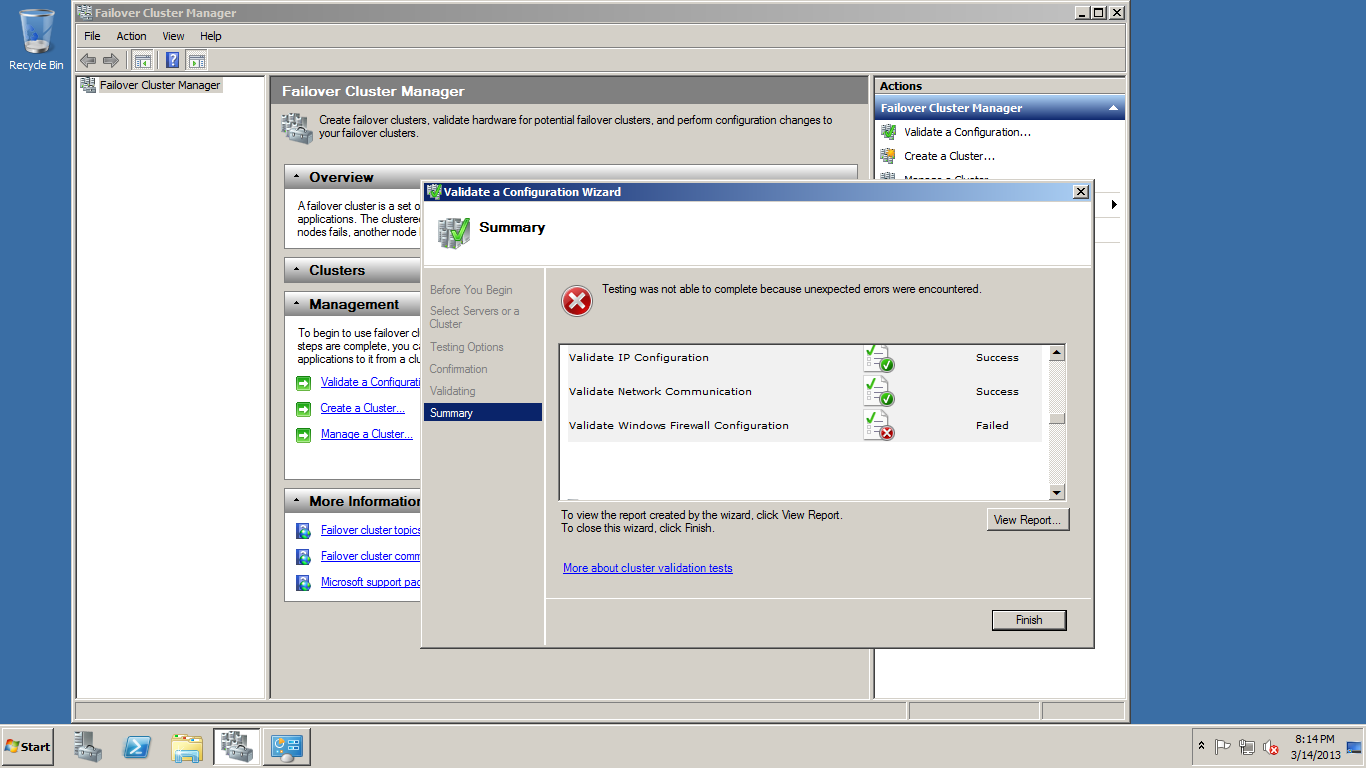
When I Prepare the Test Environment to the SQL Server Clustering  Under Windows Server 2008R2 Clustering I get this issue :

Clutser validation Error

After I Create the Cluster must be make validate the Configuration when I check this Configuration I get this issue Validate Windows Firewall Configuration in the detail of the error An item with the same key has already been added

Reason of the problem :

This is typically because the NIC GUID is duplicated between cluster nodes. When I won’t to create 3 Virtual machine (Cluster-PC , Node 1 , Node 2 )

I Create the First Virtual machine and take it Twice copy this is the issue because when I make Copy the Node 1 and Node 2 Created with the same Physical Address (MAC IP) so the Conflict in this area

the first solution came to my brain it’s I will Format Node 1 and I will install it from the first (Windows) but I Check more time to another Solution and I defected good Solution by Asking my friend System Administrator Eng.Hamada Abdelkader

Solution :

1- open the Run

2- Write this Command (sysprep)

3- Enter

this Command is System preparation it will male  preparation to the network after this Command finish I Check the mac IP very good new Address and I run the Validate Configuration for the Windows Cluster again and it successful 100%

Thanks For Eng.Hamada Abdelkader

Regards,

Eng.Mostafa Elmasry

Database Administrator

What is SQL Server events Captured in SQL Server transaction Logs


Q : Are all SQL Server events captured in the SQL Server Transaction Logs ?

A : The start and end of each transaction is saved in transaction logs

– Every data modification (insert, update, or delete). This includes changes by system stored procedures or data definition language (DDL) statements to any table, including system tables .

– Every extent and page allocation or deallocation .

– Creating or dropping a table or index.

– Rollback operations .

– Transaction SID .