Policy # Check the Data and Log file Extensions for All Dataabases


Today i will explain how to Check all Data file and log file for all your database we will check the Extensions for (MDF , NDF , LDF) by using policy management .

1- Create Conditions

at the first we will create 2 condition one for Data file and the other for Log file

I- Data File Extensions Condition

Open SQL Server Management studio >>> Mangment >>> Policy Mangment >>> Conditions >>>> Right Click on it >>> New Condition

Name : Data File Extensions .

Facet  : Data File .

Field : @File name

Data File Extensions Conditions

II – Log File Extensions Conditions :

Open SQL Server Management studio >>> Mangment >>> Policy Mangment >>> Conditions >>>> Right Click on it >>> New Condition

Name : Log File Extensions .

Facet  : Data File .

Field : @File name

Log File Extensions Conditions

2- Create policy :

Now we will Create 2 Policy one “Check Data File” and the Other is “Check log File”

I – Policy – Check Data File :

Open SQL Server Management studio >>> Mangment >>> Policy Mangment >>> Policies>>>> Right Click on it >>> New Policy

Name : Check Data File  .

Check Condition : Data File Extensions

Check Data File Policy

II – Policy – Check Log File :

Open SQL Server Management studio >>> Mangment >>> Policy Mangment >>> Policies>>>> Right Click on it >>> New Policy

Name : Check Log File  .

Check Condition : Log File Extensions

Check log File Policy

Now after we create the policy if you go to Policies and right click on Policy name ” Check Data File ” >>> Evaluate

Evaluate

After the Evaluate Finish you will find the Data file for your all databases in your SQl Server Instance if you clicked on View you will See the Full path to the MDF and NDF

in my example now i have MDF only no File Extensions  With NDF so i have More Cross

I Wish Success To Everyone

Eng. Mostafa Elmasry

Database Administrator

How to Transfer SQL Server Jobs Task from Source Server to Distention Server!


Question :

How i can transfer SQL Server jobs Task from Source Server to Distention Server without T-SQL Script ?

Answer :

We can do that by SSIS ” SQL SERVER INTEGRATION SERVICES ”  by creating new package on it to transfer the jobs task from one server to another server.

Note : also by SSIS i can trnsfer

1- Database Task

2- Error Massage Task

3- Login Task

4- Master Stored procedure Task

5- SQL Server objects Task


Demo to how to transfer SQL Server jobs task :

1- open Start menu >>> SQL Server >>>  SQL Server Business Intelligence Development Studio >>> File Menu >>> New >>> project >>> Select project type is Business Intelligence Projects from the left bar >>> select from the Right template Integration Services Project >>>write name for this Project EX (Transfer Jobs) >>> Choose your path to save the project >>> OK

Transfer Jobs_1

2- from the left Select from the Toolbox Menu under the Control flow items >>> Transfer job Task  >>> Drag and Drop this task on Control flow page >>> right click on the task >>> Select Edit .

 Transfer Jobs_2


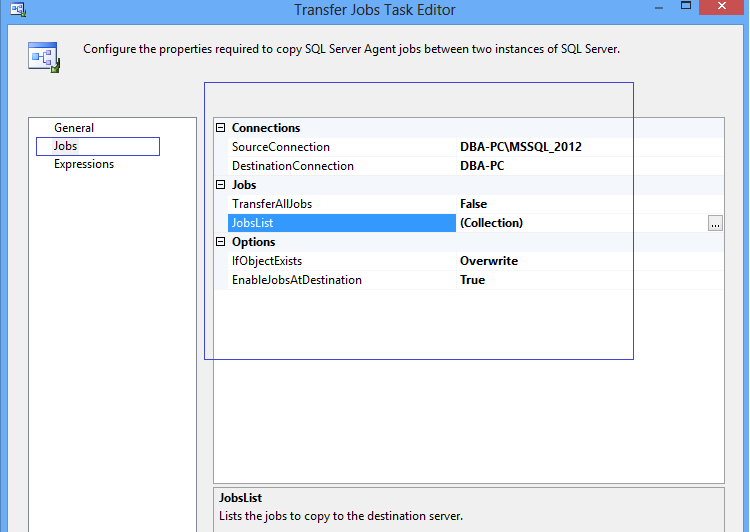
3- After the Edit we will view New Screen ” Transfer Jobs Task Editor ” >>> Select jobs from the left bar .

4- We have 3 Group :

A- Connection :

Source Connection           : The SQL Server Instance the Jobs Crated on it .

Destination Connection : The SQL Server you need to referrer the jobs to it .

B- Jobs :

Transfer All Jobs : False if you don’t need to transfer All jobs and this is Default Value , True  if you need to transfer All jobs .

Job List : if you select The transfer All jobs is FALSE Select from here the Jobs list you need to transfer it to another Server .

C- Option :

If Object Exist : Meaning if the one Job from the List job you need to transfer it to another Server it’s Created already on this Server you will Select from this 3 Value

  • FailTask : If the job Found Fail The task.
  • Overwrite : if the job Found Overwrite on it .
  • Skip : if the job Found Skip this job

EnablejobsAtDistention : False = Disable , True = Enable .

After you finish your Configuration Click OK

Transfer Jobs_3

4- now we need to run the task by F5 or Click on play icon to execute the package.

5- Now Check your Distinction SQL Server Agent Jobs you will found the New Jobs you Selected it to Transfer .

I Wish Success To Everyone

Eng. Mostafa Elmasry

Database Administrator

Drop Database # Script


USE master
GO

DECLARE @DBNAME VARCHAR(50)

SET @DBNAME = ‘HD’

DECLARE @HoldSql VARCHAR(500)

EXEC msdb.dbo.sp_delete_database_backuphistory @database_name = @DBNAME

SET @HoldSql = ‘ALTER DATABASE [‘ + @DBNAME + ‘] SET SINGLE_USER WITH ROLLBACK IMMEDIATE’

EXECUTE (@HoldSql)

SET @HoldSql = ‘DROP DATABASE [‘ + @DBNAME + ‘]’

EXECUTE (@HoldSql)

if you need to know How to Drop all Databases in your Server Check this link

Drop All Databases in SQL Server

Display Table ,Column ,KeyCols ,IncludeCols for All index


Hi Guys

by this Script you can return 

Table Name 

Index Name

Column Name Created on the index

Include Column 

=======================================================

SELECT ‘[‘ + Sch.NAME + ‘].[‘ + Tab.[name] + ‘]’ AS TableName
,Ind.[name] AS IndexName
,SUBSTRING((
SELECT ‘, ‘ + AC.NAME
FROM sys.[tables] AS T
INNER JOIN sys.[indexes] I ON T.[object_id] = I.[object_id]
INNER JOIN sys.[index_columns] IC ON I.[object_id] = IC.
[object_id]
AND I.[index_id] = IC.[index_id]
INNER JOIN sys.[all_columns] AC ON T.[object_id] = AC.[object_id]
AND IC.[column_id] = AC.[column_id]
WHERE Ind.[object_id] = I.[object_id]
AND Ind.index_id = I.index_id
AND IC.is_included_column = 0
ORDER BY IC.key_ordinal
FOR XML PATH(”)
), 2, 8000) AS KeyCols
,SUBSTRING((
SELECT ‘, ‘ + AC.NAME
FROM sys.[tables] AS T
INNER JOIN sys.[indexes] I ON T.[object_id] = I.[object_id]
INNER JOIN sys.[index_columns] IC ON I.[object_id] = IC.
[object_id]
AND I.[index_id] = IC.[index_id]
INNER JOIN sys.[all_columns] AC ON T.[object_id] = AC.[object_id]
AND IC.[column_id] = AC.[column_id]
WHERE Ind.[object_id] = I.[object_id]
AND Ind.index_id = I.index_id
AND IC.is_included_column = 1
ORDER BY IC.key_ordinal
FOR XML PATH(”)
), 2, 8000) AS IncludeCols
FROM sys.[indexes] Ind
INNER JOIN sys.[tables] AS Tab ON Tab.[object_id] = Ind.[object_id]
INNER JOIN sys.[schemas] AS Sch ON Sch.[schema_id] = Tab.[schema_id]
— WHERE Tab.name = ‘MyTableNameHere’
— uncomment to get single table indexes detail
ORDER BY TableName

Generate Script To drop and Recreate all index in Database


Hi Guys

by this Script you can Drop all indexes on your Database then Created it Again

this Cursor Script after the Execution the Result is Script With  Drop the Create all index in your database but n0t include the index on the Primary Key

DECLARE
@IncludeFileGroup bit = 1,
@IncludeDrop bit = 1,
@IncludeFillFactor bit = 1

— Get all existing indexes, but NOT the primary keys
DECLARE Indexes_cursor CURSOR
FOR SELECT
SC.Name AS SchemaName
, SO.Name AS TableName
, SI.Object_Id AS TableId
, SI.[Name] AS IndexName
, SI.Index_ID AS IndexId
, FG.[Name] AS FileGroupName
, CASE WHEN SI.Fill_Factor = 0 THEN 100 ELSE SI.Fill_Factor END Fill_Factor
FROM sys.indexes SI
LEFT JOIN sys.filegroups FG
ON SI.data_space_id = FG.data_space_id
INNER JOIN sys.objects SO
ON SI.object_id = SO.object_id
INNER JOIN sys.schemas SC
ON SC.schema_id = SO.schema_id
WHERE ObjectProperty(SI.Object_Id, ‘IsUserTable’) = 1
AND SI.[Name] IS NOT NULL
AND SI.is_primary_key = 0
AND SI.is_unique_constraint = 0
AND IndexProperty(SI.Object_Id, SI.[Name], ‘IsStatistics’) = 0
ORDER BY Object_name(SI.Object_Id), SI.Index_ID

DECLARE @SchemaName sysname
DECLARE @TableName sysname
DECLARE @TableId int
DECLARE @IndexName sysname
DECLARE @FileGroupName sysname
DECLARE @IndexId int
DECLARE @FillFactor int

DECLARE @NewLine nvarchar(4000) SET @NewLine = CHAR(13) + CHAR(10)
DECLARE @Tab nvarchar(4000) SET @Tab = Space(4)

— Loop through all indexes
OPEN Indexes_cursor

FETCH NEXT
FROM Indexes_cursor
INTO @SchemaName, @TableName, @TableId, @IndexName,
@IndexId, @FileGroupName, @FillFactor

WHILE (@@Fetch_Status = 0)
BEGIN

DECLARE @sIndexDesc nvarchar(4000)
DECLARE @sCreateSql nvarchar(4000)
DECLARE @sDropSql nvarchar(4000)

SET @sIndexDesc = ‘– Index ‘ + @IndexName + ‘ on table ‘ + @TableName
SET @sDropSql = ‘IF EXISTS (SELECT 1’ + @NewLine
+ ‘ FROM sysindexes si’ + @NewLine
+ ‘ INNER JOIN sysobjects so’ + @NewLine
+ ‘ ON so.id = si.id’ + @NewLine
+ ‘ WHERE si.[Name] = N”’ + @IndexName + ”’ — Index Name’ + @NewLine
+ ‘ AND so.[Name] = N”’ + @TableName + ”’) — Table Name’ + @NewLine
+ ‘BEGIN’ + @NewLine
+ ‘ DROP INDEX [‘ + @IndexName + ‘] ON
[‘ + @SchemaName + ‘].[‘ + @TableName + ‘]’ + @NewLine
+ ‘END’ + @NewLine

SET @sCreateSql = ‘CREATE’

— Check if the index is unique
IF (IndexProperty(@TableId, @IndexName, ‘ IsUnique’) = 1)
BEGIN
SET @sCreateSql = @sCreateSql + ‘ UNIQUE’
END
–END IF
— Check if the index is clustered
IF (IndexProperty(@TableId, @IndexName, ‘ IsClustered’) = 1)
BEGIN
SET @sCreateSql = @sCreateSql + ‘ CLUSTERED’
END
–END IF

SET @sCreateSql = @sCreateSql + ‘ INDEX [‘ + @IndexName + ‘]
ON [‘ + @SchemaName + ‘].[‘ + @TableName + ‘]’ + @NewLine + ‘(‘ + @NewLine

— Get all columns of the index
DECLARE IndexColumns_cursor CURSOR
FOR SELECT SC.[Name],
IC.[is_included_column],
IC.is_descending_key
FROM sys.index_columns IC
INNER JOIN sys.columns SC
ON IC.Object_Id = SC.Object_Id
AND IC.Column_ID = SC.Column_ID
WHERE IC.Object_Id = @TableId
AND Index_ID = @IndexId
ORDER BY IC.key_ordinal

DECLARE @IxColumn sysname
DECLARE @IxIncl bit
DECLARE @Desc bit
DECLARE @IxIsIncl bit SET @IxIsIncl = 0
DECLARE @IxFirstColumn bit SET @IxFirstColumn = 1

— Loop through all columns of the index and append them to the CREATE statement
OPEN IndexColumns_cursor
FETCH NEXT
FROM IndexColumns_cursor
INTO @IxColumn, @IxIncl, @Desc

WHILE (@@Fetch_Status = 0)
BEGIN
IF (@IxFirstColumn = 1)
BEGIN
SET @IxFirstColumn = 0
END
ELSE
BEGIN
–check to see if it’s an included column
IF (@IxIsIncl = 0) AND (@IxIncl = 1)
BEGIN
SET @IxIsIncl = 1
SET @sCreateSql = @sCreateSql + @NewLine + ‘)’ +
@NewLine + ‘INCLUDE’ + @NewLine + ‘(‘ + @NewLine
END
ELSE
BEGIN
SET @sCreateSql = @sCreateSql + ‘,’ + @NewLine
END
–END IF
END
–END IF

SET @sCreateSql = @sCreateSql + @Tab + ‘[‘ + @IxColumn + ‘]’
— check if ASC or DESC
IF @IxIsIncl = 0
BEGIN
IF @Desc = 1
BEGIN
SET @sCreateSql = @sCreateSql + ‘ DESC’
END
ELSE
BEGIN
SET @sCreateSql = @sCreateSql + ‘ ASC’
END
–END IF
END
–END IF
FETCH NEXT
FROM IndexColumns_cursor
INTO @IxColumn, @IxIncl, @Desc
END
–END WHILE
CLOSE IndexColumns_cursor
DEALLOCATE IndexColumns_cursor

SET @sCreateSql = @sCreateSql + @NewLine + ‘) ‘

IF @IncludeFillFactor = 1
BEGIN
SET @sCreateSql = @sCreateSql + @NewLine +
‘WITH (FillFactor = ‘ + Cast(@FillFactor as varchar(13)) + ‘)’ + @NewLine
END
–END IF

IF @IncludeFileGroup = 1
BEGIN
SET @sCreateSql = @sCreateSql + ‘ON [‘+ @FileGroupName + ‘]’ + @NewLine
END
ELSE
BEGIN
SET @sCreateSql = @sCreateSql + @NewLine
END
–END IF

PRINT ‘– **************************************************************’
PRINT @sIndexDesc
PRINT ‘– **************************************************************’

IF @IncludeDrop = 1
BEGIN
PRINT @sDropSql
PRINT ‘GO’
END
–END IF

PRINT @sCreateSql
PRINT ‘GO’ + @NewLine + @NewLine

FETCH NEXT
FROM Indexes_cursor
INTO @SchemaName, @TableName, @TableId, @IndexName,
@IndexId, @FileGroupName, @FillFactor
END
–END WHILE
CLOSE Indexes_cursor
DEALLOCATE Indexes_cursor