We are so proud to reveal about the new SQL Gulf Community in its new format and new name as http://www.sqlgulf.org/ , it supports 85 plus languages from different countries worldwide with immediate translation for all site menus as well as the content , it is now the new powerhouse for each DB specialist either DB administrator , DB Analyst & architect or DB developer as it is not about a blogging site but as well as sophisticated forums , RSS for all new Microsoft SQL Server 2016 blogs, Microsoft SQL Server news, Database jobs at Gulf ,Microsoft events and in addition SQL Gulf events , Online events , other events like SQL Saturdays , video tutorials ,Speakers connections , don’t forget to talk about its new impressive interface which makes articles reading and site navigation more easier for any reader doesn’t matter his SQL Server Knowledge…More later ..!
Microsoft is going very fast to SQL Server 2016 last month Microsoft announced about SQL Server 2016 and you can know more information about it from here, and today microsoft release CTP 2.1 (Community Technology Preview) you can dwenoad it from here
for the Official News from Microsoft’s Information Platform you go to this link
AS SQL Server Best Practices: Auto-Create and Auto-Update Statistics Should Be On – Most of the Time in general they are a very good thing for performance. You could try to figure out which columns need statistics, but it’s often better to let SQL Server do that for you.You can turn on the AUTO_CREATE_STATISTICS database option and SQL Server will automatically determine when it needs the Statistics and create them for you.
Check And Enable Automatic Statistic Update on all databases have this option is disable
Select ‘ALTER DATABASE [‘+Name+’] SET AUTO_CREATE_STATISTICS ON;
GO
ALTER DATABASE [‘+Name+’] SET AUTO_UPDATE_STATISTICS ON;
GO
‘ from Sys.Databases where is_auto_update_stats_on = 0 or is_auto_create_stats_on = 0
I love microsoft it is going up very fast it is triple jump in SQL Server technology Microsoft already announced about the new version of SQL Server (( SQL Server 2016 )) look herebut today we are going to try and look look at the next Microsoft data platform in SQL Server 2016 As the biggest leap forward in Microsoft’s data platform history, SQL Server 2016 delivers breakthrough mission critical performance, deeper insights across any data on many devices and enables the power of hyperscale cloud to unlock new hybrid scenarios by this new version we are going for lot of enhancement amzing job
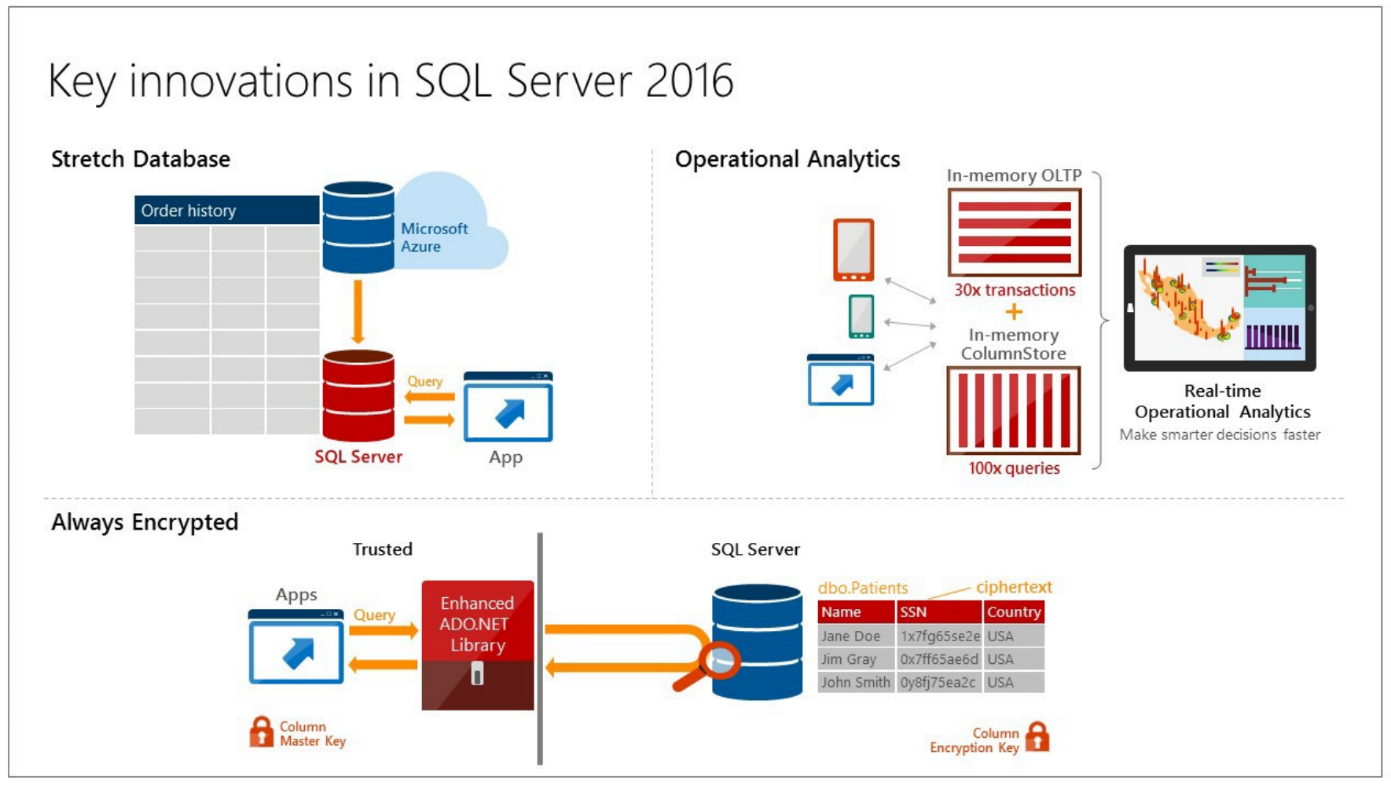
SQL Server 2016 delivers breakthrough mission-critical capabilities with in-memory performance and operational analytics built-in. Comprehensive security features like new Always Encrypted technology help protect your data at rest and in motion, and a world-class high availability and disaster recovery solution adds new enhancements to AlwaysOn technology.
What is new and Enhanced in SQL Server 2016
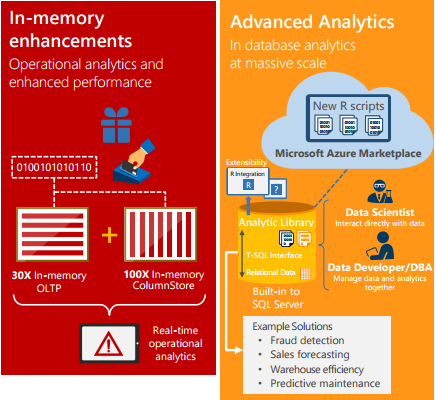
Enhanced in-memory performance with up to 30x faster transactions,
Always Encrypted
Even higher availability and performance than SQL Server 2014 with AlwaysOn secondaries with the ability to have up to 3 synchronous replicas,
Built-in advanced analytics provide the scalability and performance benefits of running your “R” algorithms directly in SQL Server
Enhanced database caching
New tools for SQL Server migration with Microsoft Azure easier than before.
for more information read the SQL Server Datasheet herealso be one for the first DBA downloaded and tried the new SQL Server 2016 version you can download it as CPT2 fromhere






 DB Cloud TECH