Shared disks on SQL Server Cluster


Hello my followers today my post is very simple post but more helpful and more important to know by the easiest way what is the shared disks on SQL Server cluster you manage it .

USE master
GO
SELECT *
FROM sys.dm_io_cluster_shared_drives
—-OR
SELECT *
FROM fn_servershareddrives()

this script will return the Shared drive names on your SQL Server cluster

Untitled

Follow the author:

View all my tips , LinkedIn Website Slideshare  , ABOUT ME

How many nodes exist in a SQL Server cluster


Bild_go-cluster+(S.+34)+-+NICHT+IN+SOCIAL+MEDIA+VERWENDEN

Any DBA going for new environment he should know how many nodes Exist in SQL Server Cluster he will mange it so today i will share with small DMV can tell us this information easily without doing more effort

“” SELECT * FROM ::FN_VIRTUALSERVERNODES() “”

DMV Return :

Node Name : the name of the Windows Server (Computer Name)

Status : Sever Status (Ruining / DOWN )

Is Current owner : it will tell you which node your SQL sever up and running on it now

Follow the author:

View all my tips , LinkedIn Website Slideshare  , ABOUT ME

Create Clustered index on all heap tables by on single click


images (1)Hi Guys today i am coming to write in very interesting subject for any DBA and DB analyst , any DBA should be care from more things one of this is Database design for this database design we should take care from heap tables and this one of the steps of Database assessment to check all heap tables and fix them by creating new Clustered index.
based on that i write one script to return the tables with more information then i will filtered it to return only the tables without any index then i will loop on this amount of tables to create dynamic statement for Create cluster index for each table.


— =============================================
— Author: Mustafa EL-masry
— Create date: 01/03/2015
— Description: DMV Create Clustered index on all heap tables by on single click
— =============================================

SET NOCOUNT ON
CREATE TABLE #Table_Policy
(
ID INT PRIMARY KEY
IDENTITY(1, 1)
NOT NULL ,
Table_Name NVARCHAR(100) ,
Rows_Count INT ,
Is_Heap INT ,
Is_Clustered INT ,
num_Of_nonClustered INT
);
WITH cte
AS ( SELECT table_name = o.name ,
o.[object_id] ,
i.index_id ,
i.type ,
i.type_desc
FROM sys.indexes i
INNER JOIN sys.objects o ON i.[object_id] = o.[object_id]
WHERE o.type IN ( ‘U’ )
AND o.is_ms_shipped = 0
AND i.is_disabled = 0
AND i.is_hypothetical = 0
AND i.type <= 2
),
cte2
AS ( SELECT *
FROM cte c PIVOT
( COUNT(type) FOR type_desc IN ( [HEAP], [CLUSTERED], [NONCLUSTERED] ) ) pv
)
INSERT INTO #Table_Policy
( Table_Name ,
Rows_Count ,
Is_Heap ,
Is_Clustered ,
num_Of_nonClustered
)
SELECT c2.table_name ,
[rows] = MAX(p.rows) ,
is_heap = SUM([HEAP]) ,
is_clustered = SUM([CLUSTERED]) ,
num_of_nonclustered = SUM([NONCLUSTERED])
FROM cte2 c2
INNER JOIN sys.partitions p ON c2.[object_id] = p.[object_id]
AND c2.index_id = p.index_id
GROUP BY table_name
————————————————————————————–
–DMV
————————————————————————————–
—-Tables didn’t have Primary key and didn’t have any index
SELECT *
FROM #Table_Policy
WHERE num_Of_nonClustered = 0
AND Is_Heap = 1

DECLARE @name NVARCHAR(100)
DECLARE db_cursor CURSOR
FOR
SELECT Table_Name
FROM #Table_Policy
WHERE num_Of_nonClustered = 0
AND Is_Heap = 1
OPEN db_cursor
FETCH NEXT FROM db_cursor INTO @name
WHILE @@FETCH_STATUS = 0
BEGIN
——-Cusror NO 2
DECLARE @name2 NVARCHAR(100)
DECLARE db_cursor2 CURSOR
FOR
SELECT name
FROM sys.columns
WHERE object_id = OBJECT_ID(@name)
AND column_id = 1
OPEN db_cursor2
FETCH NEXT FROM db_cursor2 INTO @name2
WHILE @@FETCH_STATUS = 0
BEGIN
DECLARE @SQL NVARCHAR(MAX)= N’Create Clustered index [IX_’
+ @name + ‘] on [‘ + @name + ‘]
(‘ + @name2
+ ‘ ASC) with (Fillfactor=80,Data_Compression=page)
GO’
PRINT @SQL

FETCH NEXT FROM db_cursor2 INTO @name2
END

CLOSE db_cursor2
DEALLOCATE db_cursor2
—-End of Cursor 2

FETCH NEXT FROM db_cursor INTO @name
END

CLOSE db_cursor
DEALLOCATE db_cursor
GO
DROP TABLE #Table_Policy

———————————————————————————————————————————————–

Here i can found 3 tables without any clustered index or Non clustered index

Untitled

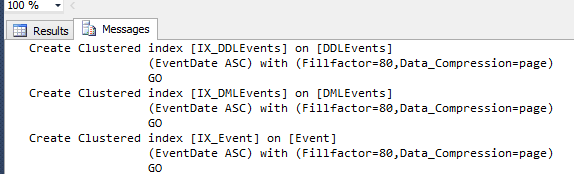
If you check the massage you will find the T-SQL print for the Creating of Clustered index for the three tables.
Untitled

by this way by one single click you can fix all heap tables on your databases

Follow the author:

View all my tips , LinkedIn Website Slideshare  , ABOUT ME

Filling all your tables with test data VII


introduction

Hi guys in my last post  (Filling all your tables with test data) i explained how we can fill multiple tables by test data by using My own Stored procedure , but after i creating the script and i do on it more test on our staging environment and it’s  working very well i got  one issues on the script ( SP can not cover the tables with composite primary key )  at this time I reviewed  the Stored procedure from the scratch to know where is the issue and how i can solve it at the end i asked on e of my best friends Mohamed Abdel Kariem mentor T-SQL to help me in this subject and at the end we do awesome script and here the below new enhancement on our main stored procedure .

Stored procedure enhancement:

  1. SP now supported tables with composite primary key
  2. SP now supported tables with composite primary key with data type uniqueidentifier.
  3. reduced the liens in the SP by using CASE technology
  4. using QUOTENAME function instead of more concat.

Continue reading “Filling all your tables with test data VII”

Where is index location on Database?


Where is index location on Database? 

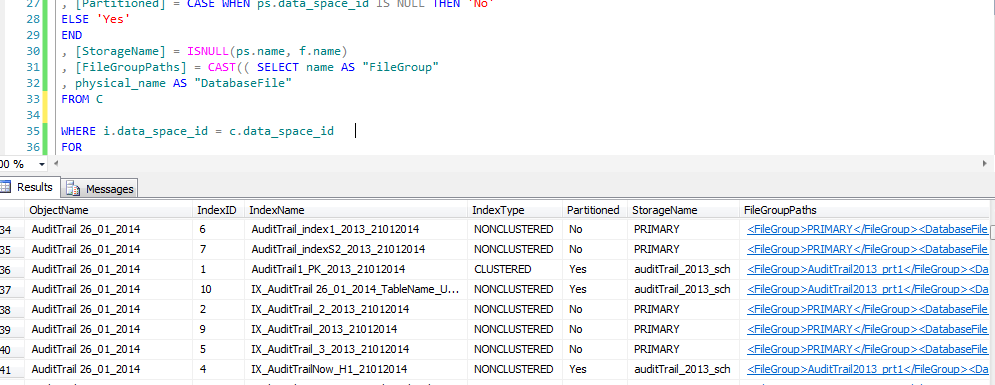
Hi guys today I will show smoothing is easy but more important to know about it {Where is the index live} by the below DMV we can return all the index with table name and with File group hosted on it , another thing you can use this DMV to know the heap tables , Clustered index , non-Clustered index

Index Location:

WITH C AS
(

SELECT ps.data_space_id
, f.name
, d.physical_name
FROM sys.filegroups f
JOIN sys.database_files d ON d.data_space_id = f.data_space_id
JOIN sys.destination_data_spaces dds ON dds.data_space_id = f.data_space_id
JOIN sys.partition_schemes ps ON ps.data_space_id = dds.partition_scheme_id

UNION

SELECT f.data_space_id
, f.name
, d.physical_name
FROM sys.filegroups f
JOIN sys.database_files d ON d.data_space_id = f.data_space_id
)
–SELECT * FROM c
SELECT [ObjectName] = OBJECT_NAME(i.[object_id])
, [IndexID] = i.[index_id]
, [IndexName] = i.[name]
, [IndexType] = i.[type_desc]
, [Partitioned] = CASE WHEN ps.data_space_id IS NULL THEN ‘No’
ELSE ‘Yes’
END
, [StorageName] = ISNULL(ps.name, f.name)
, [FileGroupPaths] = CAST(( SELECT name AS “FileGroup”
, physical_name AS “DatabaseFile”
FROM C

WHERE i.data_space_id = c.data_space_id
FOR
XML PATH(”)
) AS XML)
FROM [sys].[indexes] i
LEFT JOIN sys.partition_schemes ps ON ps.data_space_id = i.data_space_id
LEFT JOIN sys.filegroups f ON f.data_space_id = i.data_space_id
WHERE OBJECTPROPERTY(i.[object_id], ‘IsUserTable’) = 1
ORDER BY [ObjectName], [IndexName]

index

Follow me because next post I will explain everything about the index and How you can build you index model How you can Enhance your expensive query by index more Secrets in the index …ETC