Moving Microsoft Azure Resources Using PowerShell


One of the common tasks as an azure administrator you should know it when you deployed azure resource on resource group related for testing as example and you need to move it to new resource group or resource group of production we can do this activity with one PowerShell command and if you are not interested in PowerShell don’t worry you can do also from Azure Portal.

Alert 💣:Moving Azure resource will create new resource id this meaning if you any subscription or APP referencing this resource-id it will break be caution ✍ (Read More, Document the Steps, Test the Steps ) then do your implementation

To know more information about azure services check my (Latest Microsoft Azure Articles and Posts)

Moving Azure Resource Using Azure Portal

Open Microsoft Azure Portal select the source resource group and from the top, you have two option (Move or Change) both you will direct you to move your resource by the selecting the resource you need to move it then the new resource group (Destination) during this steps you can create new resource group easily.

Moving Azure Resource using PowerShell

Continue reading “Moving Microsoft Azure Resources Using PowerShell”

Azure Storage Account and Log Analytics


Monitoring Azure Storage activities depend on Azure activity log services and to access this activity log we have three options and to know more information about Azure Storage account check below posts and for all of my posts in azure check this link (Latest Microsoft Azure Articles and Posts)

Activity log: it is like the event viewer in windows when you open the storage account you will find in the left side activity log if you open it you will find all of the activities you do it and when and who do it

Activity log on azure storage account

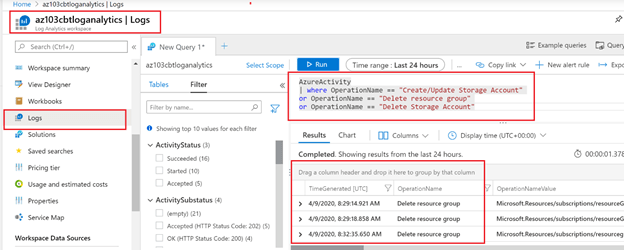
Log analytics: Search about log analytics on the Azure portal search and create new work space then on the left you will find container call “Work space data source” under it you will find Azure activity log if you click on it you will find your azure subscription just only connect the subscription to the log analytics then Go for the left side again and select Log and from here you can query your activity log using KQL query (Kusto Query Language). Look at this post to know more information about (Microsoft Azure Log Analytics).

Microsoft azure Log Analytics

Log Analytics on Activity log: we can add Log analytics as a solution on the activity log on Azure storage account to do that ( You Should Create first step 2 Log Analytics workspace > open Storage account > in the left side select activity log > on the top right side click on log > add > Select the log analytics Workspace you created it > then save > the refresh) IF you return to Log Analytics workspace in the left side select solution you will find the solution you created it.

Keep Following Me

Create Storage Account Using PowerShell and CLI Command


before Creating the Storage account i recommend to read these two articles (Microsoft Azure Storage Kind and Architecture & Managing and implementing Azure storage) first to know more information about the choices and options for Storage account. For more information about the all of the previous Posts and Articles related to Microsoft Azure services (Latest Microsoft Azure Articles and Posts)

IF you are interested to read more articles in the same subject here is below :

To create Storage account we should know some information needed for create process

  • Storage account Name: The name should be unique.
  • Resource Group: Storage account services should be created under resource group and it is recommended both to be in the same location for Example “East US”.
  • Location: Location of the Storage account it deepened on it the features of the storage account because not all features supported on all locations.
  • Account Kind: We have 5 Types (V1, V2, BlobStorage, BlockBlobStorage, FileStorge)
  • Storage Replication: Microsoft provide 6 types of replications depended on the locations and the storage account kind (LRS, ZRS, GRS, RA-GRS, GZRS, RA-GZRS)
Continue reading “Create Storage Account Using PowerShell and CLI Command”

Microsoft Azure Storage Kind and Architecture


Azure Storage it is the container for your data that you can save on it the Hot data and Cool data. but what is the best storage types i need it (Blob, File Shares, Tables, Queues)? and what is the Storage Performance and Storage kind (V1, V2,..) and what about the high availability and disaster recovery for my data.based on all of this options you will be able to determined the best azure storage kind for your Business. So before creating any Storage account you should consider the (Location, performance, Kind, replication, access tier)

After reading this post i recommend you to read this post to complete the full picture about how to manage azure storage and for more azure posts check this link by all of my azure posts and articles

IF you are interested to read more articles in the same subject here is below :

Azure Storage Location

When you are creating any resource in Azure Microsoft asking you about the location because not all locations have full azure features. That’s why the location is the the key that will determined on it the features you will have it on the Storage account. e.g. If you selected Australia Center and selected the performance premium storage you will have two kind of storage account only general Purpose V2 and General Purpose V1 but if you selected East US 2 you will have another choices in the storage kind like BlockblobStorage and FileStorage.

Continue reading “Microsoft Azure Storage Kind and Architecture”

Azure Data Explorer Cluster


Azure Data Explorer it is fully Microsoft managed services for data analytics that we can use it for real time analysis for big large of data streaming. With azure data Explorer we will have the availability to ingest massive of data from multiple sources and with azure data explorer we can start to query this massive of record using KQL (Kusto Query Language).

Keep Following this link to check all of my posts/ articles in azure services

Continue reading “Azure Data Explorer Cluster”