
Solve SQL Server Resource Database Crash


Based on Microsoft Documentation <The Resource database is a read-only database that contains all the system objects that are included with SQL Server. SQL Server system objects, such as sys.objects, are physically persisted in the Resource database, but they logically appear in the sys schema of every database. The Resource database does not contain user data or user metadata>

In this article, I will explain below 5 points:

  • information you need to know it about resource Database
  • List of Errors You can See it when mssqlsystemresource Corrupted or lost
  • Methods for troubleshooting these errors
  • Other Solutions to repair ‘mssqlsystemresource’ Database
  • How to take a backup from mssqlsystemresource Using SQL Server T-SQL
Continue reading “Solve SQL Server Resource Database Crash”

Partitioning Architecture in Azure Cosmos DB.


Introduction

In my first article in Cosmos DB, I talked about the basic information about How to provision Cosmos DB, and today we will complete our discussion in How Cosmos DB Partitioning work, and What are the Logical Partition and Physical Partition then in the upcoming posts we will talk more and more about Designing and Architecture Layers for Cosmos DB Such as Consistency levels in Cosmos DB Which Consistency levels are suitable with your APP, What are Cosmos API choices, Disaster Recovery and High Availability in Cosmos DB Keep Following ..

  • Cosmos DB Physical Partition
  • Cosmos DB Logical Partition
  • Cosmos DB Partition Key
  • How to Choose the Right Partition Key
  • Resources
Continue reading “Partitioning Architecture in Azure Cosmos DB.”

Moving Database Files on SQL Server Always On


I think all of us know how to move files for SQL Server databases from disk to another disk but today I will explain how we can do it on SQL Server always on to reduce the downtime and taking new backup to return the database to always-on again. Let us start on the technical steps.

  • Preparations Steps
  • Check the current DB Files locations
  • Check Always on Health Status
  • Disable all backup jobs on Primary and secondary servers
  • Suspend the data movement on Secondary server
  • Remove Database from Primary server
  • Update DB files by new disk location on secondary server
  • Stop SQL Server instance on Secondary server
  • Move (CUT) DB Files from old location to new Location (Past)
  • Start the SQL Server instance again
  • Verify the DB File Location Using T-SQL on the post
  • Join the DB to availability group from Primary server
  • Check SQL Server always on Health Status Using T-SQL on the post
  • Enable the SQL Server Jobs\
  • Failover the SQL Server for Primary (X) to Secondary Server (Y) and do the same steps on (X)

Let’s Start The Technical Demo

Continue reading “Moving Database Files on SQL Server Always On”

How to hide SQL databases from users using SSMS


I know the First question you will ask it  “Why we need to hidden it IF the user doesn’t have access on it and he can’t do any operation on this DB 🤔” Simple answer “Business needs & Business Case & Management Request” Whatever the answer but this is the request from management So let us see How we can do it using two solutions.

First Solution hide the DB using Permissions

Before starting on the solution, I need to highlight important point “to implement this solution the user will take ownership of the DB” and this will break the security role. To hide the DB, we need two steps after it the user when he will log in to SQL Server management studio, he will see only this database:

  • Deny or remove the permission of View on databases from the Public User on the instance level.

At this time no one will able to see any databases on the SQL Server management studio except the admins only this means you should grant this permission for specific users that you need them to view all databases “It is just view Permission, accessing the DB is another permission”.

  • Change the DB Authorization by the user name you need him to view this DB only or you can do this step on two or three or more databases at this time this user when he login to SQL Server Management studio he will view these databases only the other databases will be hidden.

Technical deployment scripts

Continue reading “How to hide SQL databases from users using SSMS”

What is Azure AD Connect Sync Engine


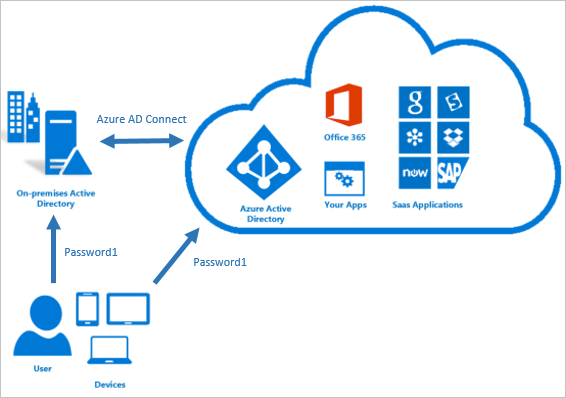
When you are planning for Hyper model and you need to sync the identity between your local active directly on-premises to azure active directory at this time you will need to know what is Azure AD connect

Azure AD Conenct

Continue reading “What is Azure AD Connect Sync Engine”