SQL Server 2012 NUMA Node Imbalance – Cont’d


Yesterday, I had posted an issue I been troubleshooting with memory allocation.  That was causing CPU to pin, you can read more about the issue at SQL Server 2012 NUMA Node Imbalance.  Even though I found what was causing it, I didn’t understand the internals well enough to identify the root cause.

Additional testing I discovered this issue is repro on Windows 2008 R2 Server with SQL Server 2012.  It does not seem to fixed that at 4000MB the issue will start; if server is busy, then it can start at a higher value.  In my re-pro test, I found it starting at even 6000MB.

As I said the up front memory allocation and management was contributing to this, however now I am unsure if Locked Pages in Memory is to contribute to this.

However, further insight I learned today.  If this issue exists, you might have Lazy Writer spinning continuously on the effected NUMA node.

Therefore if you execute following T-SQL:

select session_id, wait_type, wait_time, cpu_time, scheduler_id
  from sys.dm_exec_requests
where command = ‘lazy writer’
order by scheduler_id

Look at the output generated, if your Lazy Writer thread is working as normal (aka, only wakes up sometimes) you should see something similar to following:

clip_image002

However if you have this issue the Lazy Writer might look like below:

clip_image002[4]

  • Notice the wait_type has gone to NULL.
  • Notice wait_time has gone to 0 – signal it is not going to sleep like the rest.
  • Notice cpu_time keeps climbing.

Only work around that I know for this currently is, increase the max memory until you see lazy writer stop spinning and processor utilization starts dropping.

SQL Server 2012 NUMA Node Imbalance


One of my client has been fighting a very strange problem and there is not much literature on the topic, NUMA Node Imbalance.

Server Configuration

  • 8 NUMA nodes with 6 cores each; totaling 48 cores.
  • 256GB memory.
  • 12 Instances of SQL Server; mix of SQL Sever 2012 Latest Build and SQL Server 2008 R2 SP2.
    Issue
    NUMA node 0 pinned to 100% when all 12 instances are set to automatic CPU affinity setting.  This is recommended as default, there have been very few cases where I have had to consider changing this.  Generally default is fine, the SQL Server internal engine (or SQLOS)’s scheduler handle is very efficient at distributing load.  So why do we have it that NUMA node 0 was pinned?
    Initial Troubleshooting

Any time we have performance problem on a server that is running SQL Sever instances; my first question to ask is, is it really SQL Sever? Looking at task manager or resource governor, both show highest CPU utilization of under 5%.  This is not surprising, as the CPU in both of these tools provides an average over all CPUs.  Therefore there is no easy way to know which instances were causing the NUMA Node 0 on the server to pin.  There is nothing obvious that is also visible if I filter through the DMV/DMFs with in each instance.

However due to performance issues, my client decided to manually distribute the load across the 8 NUMA nodes by using CPU affinity mask setting.  And sure enough load on NUMA node 0 went down; however he only did it for subset of the instances.  So load decreased from 100% to about 70%.

Research and Investigation

While doing investigation, I only found two KB articles that talk about NUMA node performance issue on SQL Server 2012, KB2819662 and KB2926223. However, all the SQL Server 2012 instances are on latest build; therefore, these hot fixes did not apply.  I also found KB relating to operating system and NUMA processor pressure issues, however all turned out to be not the issue here.  Because even operating system was fully patched.

In order to troubleshoot what is causing CPU pressure issue on NUMA node 0, we decided to move all instances off NUMA node 0 by using CPU affinity mask setting.  In doing so we eventually found instances that was causing the load.  There were 6 instances that were contributing the load.

After investigating we found, locked pages in memory is enabled by default on each instance and found all affected instances had their maximum set to 4000MB.  I remember reading it is no recommended to have maximum memory set to such a low value.  Therefore, we increased it to 6000MB.  Doing so instantly caused the CPU on NUMA node 0 to return to nominal levels.

Details

MaxMemory_at_4GB

Memory settings on SQLInstance01

CPUAffinity_At_Node5

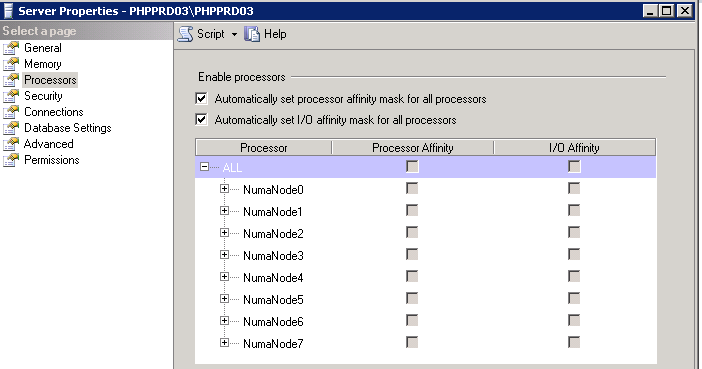
Processor Affinity Mask Setting – Set to NumaNode03 for SQLInstance01

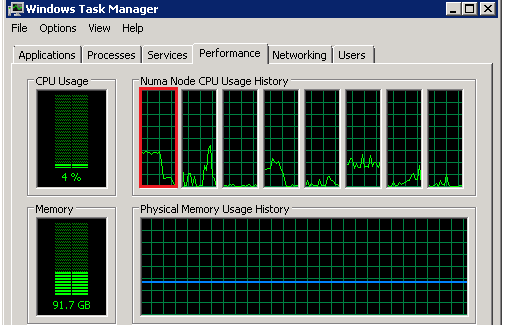
Above is an example of SQLInstance01, set to 4000MB with processor affinity set to NumaNode03.  If I look at the CPU now, there is no issues as in screenshot below.  However load is not running on NUMA node 0 right now.
CPU_LoadBefore_Rebalance

CPU Load on NUMA Node 0 (highlighted in red) – Nominal
CPUAffinity_At_Auto

Processor Affinity Mask Setting – Set to Default for SQLInstance01

Now if I change the instance to use all NUMA nodes, as per the default configuration, as in screenshot above.  Processors on NUMA node 0 start to pick up again. Notice the change was almost instantaneously.  Since I only did it for one instance it did not cause processor to pin to 100%; however hovered around 40% constant.  Imagine that times 6 instances, no wonder NUMA node 0 was pinned to 100%.

CPU_LoadAfter_Rebalance

CPU Load on NUMA Node 0 (highlighted in red) – After Affinity Set to Auto in SQL Server

Now if I adjust the max memory setting to 8000MB (I tested it with 6000MB); both settings, processor returned to normal performance; as per the screenshots below.

MaxMemory_at_8GB

Memory setting on SQLInstance01 – Setting it to 8000MB

CPU_LoadAfter_Rebalance_MemoryUpdate

CPU Load on NUMA Node 0 (highlighted in red) – After setting the Memory to > 4000MB

Summary

If you are using 64-bit of SQL Server (which is all version now) and have locked pages in memory enabled.  Be careful in setting the maximum memory value to a low value.  Because of locked pages in memory additional work needs to be done by SQL Server to manage the memory and from looks of it all this work is happening on NUMA node 0.  I do not know if this is by design.  However setting the memory to value higher then or equal to 6000MB resolved this issue.

I’ll follow up on this if I have any updates, as I’ll be raising the issue internally also.

This post is cross posted on my SQLCAN Blog, MSDN Blog, and SQL server Consultation blog.

Microsoft SQL Server Database Migration


Database Migration

Hi My followers As we are database administrator (DBA) and DB Consultant we should now How we can Migrate the databases from the production server to another server without downtime  we have two cases we will need the migration on it.

  • SQL Server Upgrade :

As we see Microsoft is going for more enhancement in SQL Server like SQL Server 2014 and now SQL Server 2016 so if you need to upgrade your Database production you have two option :

  • Upgrade your production in the same site (No need to migration)
  • build new Environment then migrate the database from the old server to the new server.(Need SQL Server Migration)
  • SQL Server Consolidation : 

Here in this case if you have some SQL server Instances and you need to consolidate all of them in one or Two instance with high specification.

Database Migration Steps :

  • Create Full backup device for all databases will be Migrated and make the backup device URL on the Destination server (B) \\Server_B so by this Way you will take the Full backup direct to the Target server.

Select ‘USE [master]
GO
EXEC master.dbo.sp_addumpdevice @devtype = N”disk”,
@logicalname = N”’+name+’_tape”, @physicalname
= N”K:\BackupDB\P-S-SQLCLSMSSQL2008backup\’+name+’_tape.bak”
GO
‘from Sys.Databases where state_desc =’online’
and database_id >4

Continue reading “Microsoft SQL Server Database Migration”

New SQL GULF Community


We are so proud to reveal about the new SQL Gulf Community in its new format and new name as http://www.sqlgulf.org/ , it supports 85 plus languages from different countries worldwide with immediate translation for all site menus as well as the content , it is now the new powerhouse for each DB specialist either DB administrator , DB Analyst & architect or DB developer as it is not about a blogging site but as well as sophisticated forums , RSS for all new Microsoft SQL Server 2016 blogs, Microsoft SQL Server news, Database jobs at Gulf ,Microsoft events and in addition SQL Gulf events , Online events , other events like SQL Saturdays , video tutorials ,Speakers connections , don’t forget to talk about its new impressive interface which makes articles reading and site navigation more easier for any reader doesn’t matter his SQL Server Knowledge…More later ..!

SQLGULF

What is the meaning of SQL Command


Hello Followers today i will explain very small information but actually for me it is more good info because we should no the concept for our tools we are working on it so As we are DBA , DB Analyst or Developer we should know what is meaning of  SQL Command ? and what is SQL ?

What is SQL?

SQL is Structured Query Language, which is a computer language for storing, manipulating and retrieving data stored in relational database.

SQL is the standard language for Relational Database System. All relational database management systems like MySQL, MS Access, Oracle, Sybase, Informix, postgres and SQL Server use SQL as standard database language.

Also, they are using different dialects, such as:

  • MS SQL Server using T-SQL,
  • Oracle using PL/SQL,
  • MS Access version of SQL is called JET SQL (native format), etc

Meaning of  SQL Command :

SQL Commands are mainly classified into four types, which are DDL command, DML command, TCL command and DCL command.

SQL is mainly divided into four sub language

  • Data Definition Language(DDL)
  • Data Manipulation Language(DML)
  • Transaction Control Language(TCL)
  • Data Control Language(DCL)

command types in SQL DataBase

To check all my posts you can direct to my personal website or you can download this Excel sheet My Technical POSTS

View all my tips , LinkedIn Website Slideshare ,Youtube Channel. 1st QT Achievement in 2o15