Hybrid Cloud and Hekaton Features in SQL Server 2014


Introduction

Microsoft SQL Server 2014 is considered to be the first version that supports Hybrid Cloud by adding a lot of exciting new features.

In this article, I will cover some of the top new features in these main points including Hekaton and Hybrid Cloud enhancements:

Hekaton

Hekaton is the code name of the new feature of In-Memory OLTP. It is a new database engine, fully integrated with SQL server and designed to enhance memory resident data and OLTP workloads. In simple words, with Hekaton we can store the entire table in memory.

Let’s list some of the benefits of this new feature:

  • Memory-Optimized-Tables can be accessed using T-SQL like Disk-Based-Tables.
  • Both of Memory-Optimized-Tables and Disk-Based-Tables can reference in the same query, and also we can update both types of tables by one transaction.
  • Stored procedures that only reference Memory-Optimized-Tables can natively compile into machine code which results in improving performance.
  • This new engine designed for a high level of session concurrency for OLTP transactions.

There are still some limitations for Memory-Optimized-Tables in SQL server 2014 which are:

  • ALTER TABLE statement, SP_RENAME stored procedure, ALTER BUCKET_COUNT statement, and add\remove index outside statement of CREATE TABLE, all of these not supported by In-Memory table
  • Some constraints not supported like (CHECK, FOREIGN KEY, UNIQUE)
  • RANGE INDEXES and TRIGGERS not supported by In-Memory table
  • REPLICATION, MIRRORING, and LINKED SERVERS are incompatible with Memory-Optimized-Tables.

To know more information, you can check SQL Server Support for In-Memory OLTP.

Memory-Optimized-Tables are appropriate for the following scenarios:

  • A table has a high insertion rate of data from multiple concurrent sources
  • A table cannot meet scale-up requirements for high performance of reading operations especially with periodic batch inserts and updates
  • Intensive logic processing inside a stored procedure
  • A database solution cannot achieve low latency business transaction

Let’s now go through the steps to create a Memory-Optimized-Table


For more information check the source article from HERE

How to analyze Storage Subsystem Performance in SQL Server


introduction

To improve performance, it is common for DBAs to search in each aspect except analyzing storage subsystem performance even though in many times, issues are, in fact, caused by poor storage subsystem performance. Therefore, I want to give you some tools and recommendation that you can use it to prevent your storage subsystem from being a performance issue for you.

In this article, I will cover how to measure and analyze your storage subsystem performance and how to test your storage subsystem including

  1. Main metrics for storage performance
  2. Operating System Tools to measure storage performance
  3. SQL Server Tools to measure storage performance
  4. Using SQL Server to test storage performance

Main metrics for storage performance:

In this section I will introduce the three main metrics for the most storage performance issues as follows:

  1. Latency
    Each IO request will take some time to complete this latency is measured in milliseconds (ms) and should be as low as possible
  2. IOPS
    IOPS means IO operations per second, which means the amount of reading or write operations that could be done in one second. A certain amount of IO operations will also give a certain throughput of Megabytes each second, so these two are related
  3. Throughputs
    The most common value from a disk manufacturer is how much throughput a certain disk can deliver. This number usually expressed in Megabytes / Second (MB/s), and it is simple to believe that this would be the most important factor

For More information please check the source article from HERE

Top 5 new features in SQL Server 2012 for developers


Introduction:

Microsoft SQL Server 2012 introduces many features that help database administrators, database developers, and BI developers.

In this article, I will cover some of the new features for database developers in these main points:

  • Database Engine Improvements
  • Improvements to SQL Server Management Studio Debugging
  • Changes to the Scope of Objects
  • Conclusion
  • References

Database Engine Improvements:

  1. File Tables:When we open up SQL Server Management Studio, one of the first changes we notice for SQL Server 2012 is the addition of a new type of table called a File Table.

    File table allows us to make a connection between windows share and a database table such that any file that appears in the share will become a row item in the table.

    It allows us to run queries that tell us how many files we have in that shared location, what type of files, what size the files are, etc….

    Setting this up is a multiple step process:

    • Enable file stream: is The first step we have to do at the instance level.We will do that with the configuration manager tool, open properties of the instance we are interested in, and there is a tab for file stream, in there we should click on all of the checkboxes(enabling all features) as below

word-image-51


To complete the article check it HERE

SQL Server performance – measure Disk Response Time


Introduction

As DBAs, we all get to the point where we are asked to setup a new server for a particular environment. Setting up a new server is not a big thing but giving the answer to the question that “how well it will work” might be tricky.

There are tons of items which we can set up to measure how well the newly installed server will receive a response, but here I will discuss one of the most valuable resources of the server “Disk.” Most often the disk is not measured correctly, or I have seen environments where the disk response time has never been measured. I will discuss here a tool from Microsoft which is very handy and can solve your problem very quickly. The diskspd.exe!

It’s the superseding version of SQLIO which was previously used to measure IO response time for the disk. The source code of diskspd.exe is hosted on GitHub. You can download this free utility from Microsoft’s website using this link.

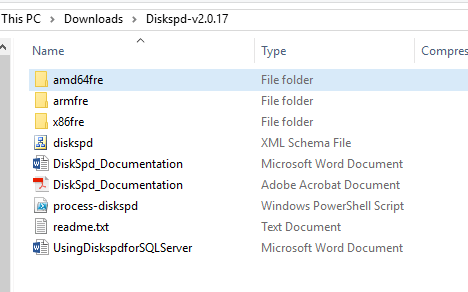
After you download the utility, you will get a zip file. Just unzip the file, and it will give you the folders and files as shown in the below screenshot. You will-will need the eye of diskspd inside the folder “amd64fre” if you have a SQL Server 64-bit version (most of us will be having this).

To complete this article please check it here


word-image-29

Concept and basics of Temporal tables in SQL Server 2016


In this article I’ll cover all aspects of a new SQL Server 2016 feature, Temporal Tables (System-Versioned), including:

  • Introduction
  • What is a temporal table?
  • Why Temporal table?
  • How does temporal table work?
  • Consideration and limitation
  • Temporal tables vs CDC
  • Creation and configuration
  • Clean up and removal
  • References

Introduction

AS we know, Microsoft released SQL Server 2016 RTM version (13.00.1601.5) and in November of 2016 updated it by the latest CU (Security Bulletin MS16-136 (CU) KB #3194717) (13.0.2186.0) you can check this update from here.

To complete this artcile please check it here in SQLShack