Manage Azure Policy Using PowerShell


Azure Policy is a Microsoft service in Azure used for creating and managing policies , assignments and definition and it is used to force some roles on some resources in case of some actions.

  • Policy definition: is the conditions of the policy
  • Policy assignment: in the part we can define which resource or services you need to apply this policy on it , add in your note that the policy assignment by default inherited so for example if you applied Policy on Subscription it will be inherited on all of the resource under this subscription
  • Policy parameters: it will give you the availability to custom your policy
  • Azure initiative Policy: it the like Azure policy but we can use when you need to do group of policy in one step and it is containing the 3 parts (initiative definition, initiative assignment, initiative parameters) “Policy Combo
Azure Policy

Today we will create Azure policy to enforce any new resource for using tag let’s go to see how we can create this policy using PowerShell Command.

IF you need to check all of my azure posts ➡ Latest Microsoft Azure Articles and Posts

  • Create Resource Group “IF you need it is not mandatory”
  • Save the Resource Group in PowerShell variable ($resource)
  • Call the Resource Group ID
  • Get the Azure Policy definition of required to assign tag for any new resource will be created
  • Save the Azure policy information into PowerShell variable ($Policy)
  • Create Azure Policy
Continue reading “Manage Azure Policy Using PowerShell”

How to Solve Error Azure Recovery Services vault cannot be deleted


Today when I am doing cleaning for the azure resources that I don’t need it to reduce the cost, I tried to remove Resource Group contain Recovery Service vault Services but it gives me error

Failed to delete resource group prodresouorcegroup: Deletion of resource group ‘prodresouorcegroup’ failed as resources with identifiers ‘Microsoft.RecoveryServices/vaults/elmasryvmbackupvault1’ could not be deleted

Then when I tried to remove the recovery services vault it gives me another error

Vault cannot be deleted as there are existing resources within the vault. Please ensure there are no backup items, protected servers or backup management servers associated with this vault. Unregister the following containers associated with this vault before proceeding for deletion. For instructions, see https://aka.ms/AB-AA4ecq5

After some Google Search I know the correct steps for deleting  Azure Recovery services vault

Continue reading “How to Solve Error Azure Recovery Services vault cannot be deleted”

Sync your local files with Azure Storage Sync Service


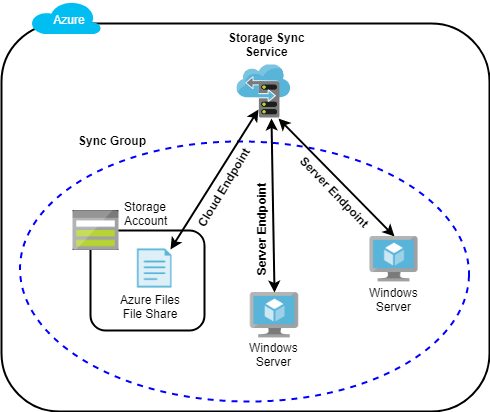
We talked before about Storage and the types of storage and how to manage the storage but today we will talk about the file share that’s one of the types of azure storage and the questions now after creating the file share how I can sync my files from my V-Center VM to Azure File share, Microsoft provided us services called Azure file sync so to let us know how we can configure it and what is the prerequisites we should configure it on the V-Center VM

For more information about Azure Storage check below posts and if you need to check all of my azure posts ➡ Latest Microsoft Azure Articles and Posts

Managing and implementing Azure storage
Microsoft Azure Storage Kind and Architecture
Create Storage Account Using PowerShell and CLI Command
How To Monitor Azure Storage Account
  • Create Azure File Share.
  • Files Assessment on local V-Center VM.
  • Install Azure File Sync on Azure.
  • Install Azure File Sync on local V-Center VM
  • Registration Verification
  • Create Cloud Sync endpoint and server endpoint
Sync your local files with Azure Storage Sync Service
Continue reading “Sync your local files with Azure Storage Sync Service”

Moving Azure VM Using Recovery Service Vault


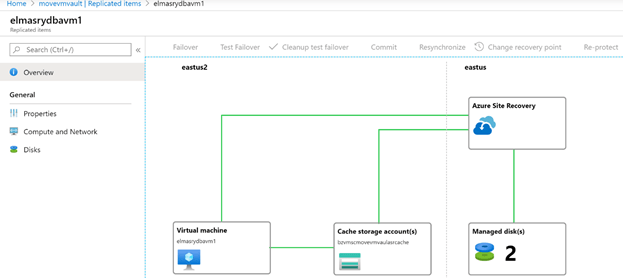
As I explained before on my last article [Virtual Machine (VM) Backup and Restore (Vault)] that we can use the Azure recovery services vault for taking backup and doing a restore from azure VM using recovery services vault also the same services can be used to migrate your local VM from V-center to Azure using (Recovery services vault site recovery) and in this post, we will explain how to use this services recovery vault to Move VM between two rejoin and to do failover easily for the VM. Let’s go for technical steps

To know more information about azure services check my (Latest Microsoft Azure Articles and Posts)

  • How to build replication on VM
  • How to do Test Failover
  • How to do Real Failover
VM Replication From East US2 to East US
Continue reading “Moving Azure VM Using Recovery Service Vault”

Virtual Machine (VM) Backup and Restore (Vault)


Introduction

Azure Recovery service vault It is azure built in services doesn’t required any infrastructure preparation and it is supported multiple types of backup (VM , File , Disk and SQL Database) it is one of the built options in the VM , so easily when you open Azure virtual machines and select your VM you will find in the left side Backup from this point and this place you can start to manage your backup and restore process as well you can keep monitoring your backup jobs and restore jobs let us go for demo and how to do VM backup and restore it and what is the restore types supported.

  • Azure backup Process.
  • Azure backup hints
  • How to start to take backup from VM
  • Azure Recovery Services vault
  • Azure Restore Options
  • Azure Restore Hints
  • How to do VM restore from Azure recovery services vault

To know more information about azure services check my (Latest Microsoft Azure Articles and Posts)

Azure backup Process:

How the backup process will start and what is the sequences that running behind the seances when I asked azure backup services to take backup from my MV.

  • You need to install Azure backup recovery vault Services
  • Define backup policy then the backup extension will be installed.
  • After this the backup services will start to discovery and analysis your VM disks, files, data and size.
  • Then It will start to create Snapshot from your data. That’s why the backup process sometimes take time but this time will not be more than 24 Hours.
  • After the snapshot completed the Azure backup extension will transfer the snapshot to azure backup recovery vault.

Azure backup hints

Continue reading “Virtual Machine (VM) Backup and Restore (Vault)”