
When you are planning for Hyper model and you need to sync the identity between your local active directly on-premises to azure active directory at this time you will need to know what is Azure AD connect
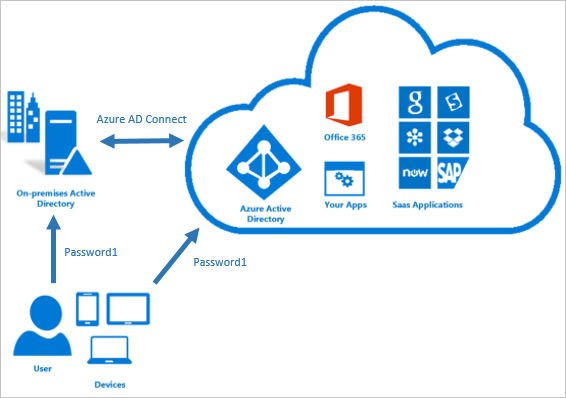
When you are planning for Hyper model and you need to sync the identity between your local active directly on-premises to azure active directory at this time you will need to know what is Azure AD connect
Microsoft provided us multiple types and series from Azure VM supported all of the workloads with many of options that we should consider it before going for moving your services to azure VM we should understand very well what is the VM types and what is the Microsoft recommendation for choosing the VM type based on the workload.
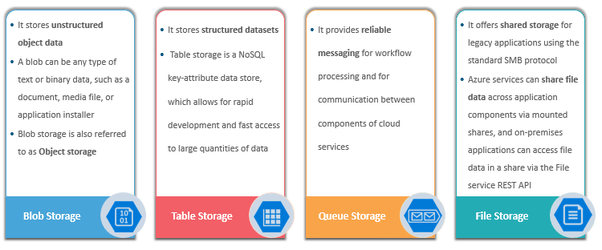
IF you are planning for (Az-103) Microsoft Azure Administrator Exam or new update from this certification (AZ-104) Microsoft Azure Administrator (beta) that will be available on or around April 2, 2020, you should take in your consideration implement and manage storage this part is (10-15%) from the exam . in this post I will share some important key note that can-do refresh for you in this part.
IF you are interested to read more articles in the same subject here is below :
There are four layers in Azure SQL Architecture most quite similar to on-premises

#PowerShell, #Bash and #CLI, and the most common language now for how to manage #Azure are very helpful when you need to automate the tasks did you imagine that you can know provision new VM or new SQL on Azure using your mobile though azure mobile app with Powershell. 💥⛈
If you asked me what is the best? I will be told you nothing all of them are very powerful language and choosing which one of them depends on your past experiences If you are coming from background windows so the PowerShell is the most compatibles with you and if you are coming from Linux background Bash will be the most compatible with you.
Take Control of the Cloud with the Windows Azure PowerShell Cmdlets https://channel9.msdn.com/Events/TechEd/NorthAmerica/2013/WAD-B305#fbid=
This is our post of today, all of us know that we have the availability to write PowerShell or Bach code from Azure portal itself😲 . But if we need to manage the portal from our PC, we need to install some tools and import some modules, at the end of the post you will find most of the tools and requirements and advanced tools you can use it on your local PC or on-Premises server to manage Azure.🦾
Continue reading “How to manage Azure using Windows PowerShell”Note🚦: If you didn’t used Cloud shell before on Azure portal, when you start it portal will ask you to create Storage account for more information check this post “Step by Step How to Enable Azure Cloud Shell in Microsoft Azure“🚀

 DB Cloud TECH