As we know Azure SQL Database elastic pool is one of the Microsoft Azure database deployment model options to know more about these models check this post and to know more about Azure Single Database check this article and if you interested to check all of the Azure SQL Articles check this link, IF you are Preparing for AZ-103 Azure Administrator Certification check this Article
AS we now Azure SQL Single database is one from deployment Azure Database models if you need to know more information check this post-Azure Database Deployment model options today I am writing about Fundamental information for Azure Single Database
For More Azure Database Articles Check this Link and If you are Preparing for AZ-103 Azure Administrator Certification check this Article
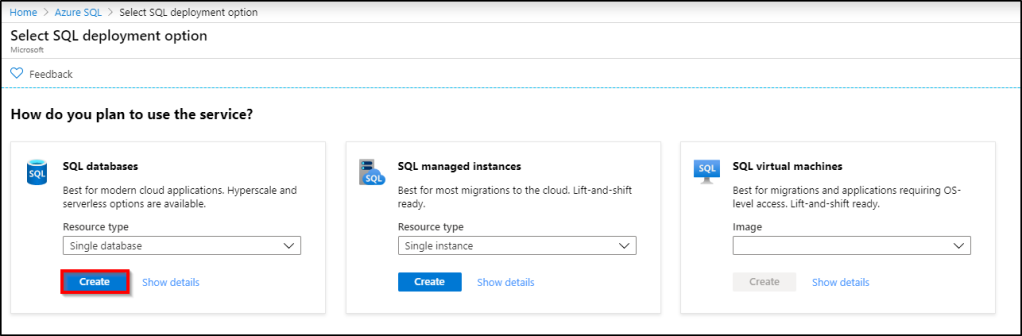
Create Azure Single Database
The Single Database deployment option creates a single isolated database in Azure SQL Database
Azure Single Database Support DTU-based and Vcore-based Purchased Model
The internal of SQL Database server is hidden from the end-user and all are managed by Microsoft Azure
Azure Single Database has it is own Resources (DTU or V-Core) and this resource will not be shared with other databases in the same single instance. Each Database has dedicated resources.
Single Database Isolated meaning if you created two single databases on the same single database server each Database has dedicated resources and the two databases cannot be communicated together and I think this one is a security feature
This means Azure Single Database is the best option for small workloads with applications connects to one DB.
To Provision Azure SQL Single Database, you need (resource Group, Database name, Server Name, User Name, Password, Location, deployment option either single or elastic pool, Compute Storage and purchase model either DTU-based or vCore-based)
In Azure SQL Single database provisioning you can create new or select existing one from (Resource group and Server name)
In Azure SQL Single database provisioning the (resource Group, Database name, Server Name) Should be a unique name.
My Name Is Mustafa Elmasry I am Database Consultant MCTS, MCTIP, MCSA, MCSE, MCT for more information about me check this page Today I need to announce that I am Very Excited and Thrilled to have passed my AZ-103 I am now Microsoft Certified: Azure Administrator Associate, That’s how I pass my time during #COVID19 days. From 5 months I passed AZ-900 Microsoft Certified: Azure Fundamentals and I started to prepare for Azure Administrator Exam AZ-103 and I am preparing now for the AZ-104 beta new version. I know that I am Database Engineer and this certification not related directly to my carrier objective but I have believed that before starting to learn any cloud services you should have full visibility about azure infrastructure to be able to manage your Azure services well. During the last 5 months, I started to my study journey for Azure administrator and from the first day, I took a covenant on myself to write down all of the notes, hints, and tricks to be a repository that can help the others for how to prepare for Azure administrator certification in this post you will find all of the resources, notes and even the articles I write it during this journey. I take 3 Courses to prepare for the exam AZ-103. In this article, you will find two documentation The First one contain all of the tips and hints I recorded during my study, and the second one it is full documentation explain most of the features and services in azure administration track. In the end, I will be so happy if you share with me your comment and feedback on this post and documents also if anyone has any issue in SQL Server or Azure SQL don’t hesitate to contact me
Today in Article I will explain How we can enable the Auto Failover group on Azure SQL and what is different between Auto-Failover Group and Active Geo-Replication in Azure SQL. Before starting in How to implement the Azure SQL Auto Failover Group I recommend you to take a look on this ➡️ POST to understand How you can configure Active Geo-Replication on Azure SQL and for more Azure SQL articles check this ➡️ LINK and for more other Azure Posts and articles check this ➡️ LINK for all of my azure articles
Active Geo-Replication VS Failover Group
How to enable Auto-Failover Group on Azure Single SQL Server
Check the Failover Group Configuration and Connections


 My Name Is Mustafa Elmasry I am Database Consultant MCTS, MCTIP, MCSA, MCSE, MCT for more information about me check this


 DB Cloud TECH