Azure Cosmos Database Basics


Introduction

Azure Cosmos Database one of the Non-Relational NoSQL Database provided by Microsoft and we have another NoSQL Options in Azure like (Data Lake Storage Gen2, Blob Storage, Redis Cache, HBase in HDInsight), also Azure Cosmos Database Supported multiple API like (Core SQL, Mango DB, Cassandra, Graph, Azure Table) IF you need to learn more about this Point Check this Link Choose the appropriate API for Azure Cosmos DB, Azure Cosmos Database supported Write option in multiple regains in the same Database and the synchronizations tacking care about syncing the data. For more information about Azure Cosmos database, I highly recommend you to look into Microsoft Documentation

  • How to Provision Azure Cosmos DB Account
  • How to Provision Azure Cosmos DB Container
  • Load and Explorer the data into Azure Cosmos DB Container
  • Replication in Azure Cosmos DB
  • Data Consistency in Azure Cosmos DB
  • Cosmos DB and open Source
  • Azure Cosmos Database Resources
Cosmos DB NoSQL

How to Provision Azure Cosmos DB Account

To Create Azure Cosmos Database we need to create First Database account and this like Database instance we can host on it multiple databases, then after this step, we need to create Container ID and this the Database name in this you can find below what is the information required when we need to create Azure Cosmos Database account and for how to do it check below 👇✅ GIF File ✅to know how you can do it and For more information Check this Article

  • Account Name: it is like the instance name in SQL Server
  • Notebooks: Jupyter notebook is an open-source web application that allows you to create and share documents it is like the Azure Data Studio Notebook For more information read this Article
  • Location: The location you need to host on it your Azure Cosmos DB account
  • Account Type: It is something like a definition or categorized, we can consider it like Azure Resource Tag.
  • Geo-Redundancy: Enabling this Option automatically replicates your data to the region geo-paired with your current region you selected it. For more information about the Region geo-paired check this link Azure Regional Pairs IF you don’t enable it during the setup you can enable it after the configuration from the main overview of the Azure Cosmos Account
Enable Geo-Redundancy
  • Multi-region Write: Enable the write option on the Regions you selected it on the geo-redundancy this means If you need to enable the Multi Regions Write option you Should Enable the Geo-Redundancy option with it this option you can enable it after the installation from Replicate Data Globally option If you need to learn more about this option check this Link

Continue reading “Azure Cosmos Database Basics”

Azure SQL Database Automatic Tuning Feature


What is Azure Automatic Tuning Feature

Microsoft Azure SQL Database Automatic tuning one of the monitoring and tuning features we can use it on Azure SQL for more information about other monitoring and tuning services check this Article, Automatic tuning is a fully managed intelligent performance service used for collecting the Azure SQL Database Workload and monitor queries executed on a database continuously, and it is working based on AI Artificial intelligence and ML Machine Learning technologies, with Automatic tuning Azure SQL will automatically capture all of the performance issues and analyze it then will create a new index or drop index  based on the performance case, even one of the capabilities of this services after applying the performance solution it will be under validating based on the AI and ML technologies and if the Azure Automatic tuning found this solution not fixed the issue, it will rollback it automatically, all of this actions will be recorded in the logs to be able to track it

Continue reading “Azure SQL Database Automatic Tuning Feature”

Security Layers on Azure SQL Database


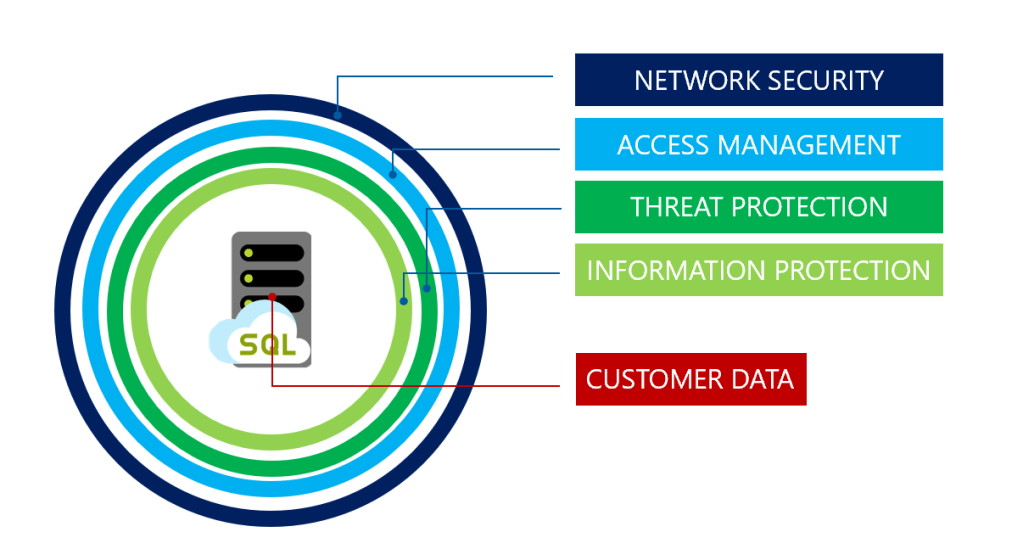
In this article I will explain the options available on Azure we can use it for securing Azure SQL Database, as we know that we have azure deployment model options (Single Database, Elastic Pool, Managed instance, SQL on Azure VM) our article today focused on Azure Paas Database deployment option (Single Database, Elastic Pool, Managed Instance) for more information about Database Deployment option and more details Azure SQL Database deployment models check below articles and if you are interested in more Azure Articles in Database and other services check this Link, also IF you are preparing for Azure AZ-103 so this Post for you check it now.

  1. Azure Database Deployment model options
  2. Azure Single Database Fundamental
  3. Azure SQL Database Elastic Pool Fundamental
  4. Azure SQL Database Managed Instance Fundamental
Azure Database Security Layers
Continue reading “Security Layers on Azure SQL Database”

Azure SQL Database Data Sync Group


Introduction

Azure Data Sync is Microsoft service announced on June 18, 2018, and it is used to sync the data from Azure SQL to another Azure SQL Database or from SQL Server on-premises to Azure SQL Bi-Directional this services used for data sync only and you should not use it as disaster recovery or as migration tool or as read-only replica IF you need to know when you should use azure data sync check this Microsoft article, and if you need to know What is the best option for Azure SQL Database Migration, replication and read-only check this link you will find very useful articles

Azure Data Sync Concept

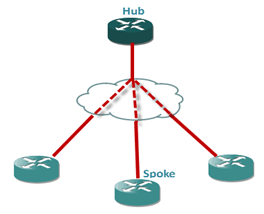
  • Sync Group: is one of the databases that you want to synchronize
  • Hub Database: is one the synchronize Databases
  • Member database: another database in the data sync synchronization is member databases
  • Synchronization: Happened between Hub Database and member databases this means when you do change on one of the member databases the changes reflected on the other member databases through the Hub database
Continue reading “Azure SQL Database Data Sync Group”

Azure SQL Elastic Database Job Agents Configuration


Introduction

As Database administrator we know that SQL jobs managed by SQL Server agent services, but this concept on SQL Server on-premises, in Microsoft cloud we have another something called Azure SQL Elastic job. Before starting in the definition of it I highly recommend you to understand first what is Azure database deployment model options and How we can configure Azure single database, Azure elastic Pool database and Azure Database Managed Instance Check Below Articles 👇

In this article of today I will cover below points and these points from my view are the basic points still we have many others points in this subject and I will cover it in the upcoming posts, Keep Following me and if you are interested to learn more about Azure SQL Database check this link and if you are interested to prepare for Azure administrator certification AZ-103 or AZ-104 check this link

  • What is the Azure SQL Elastic Job?
  • Differences between Azure SQL Database Jobs and SQL Agent
  • Azure SQL Elastic Database jobs Component
  • Configuration Prerequisites
  • Azure SQL Elastic Job Full Configuration (8 Steps)
  • Review the Elastic Job Configuration
  • References
Continue reading “Azure SQL Elastic Database Job Agents Configuration”