
Azure Date Transfer Solutions


Microsoft Azure provided verity of options for how to transfer your data from or to your storage or from on-premises to Azure or from Azure to on-premises many of options and I explained before some of them like Azcopy check this  ➡  post , Azure Data Migration Services (DMS) Check this  ➡  Post  , Azure Storage Explorer Check this ➡  Post.

And to know more about this this solution easily you open your storage account and in the left side you will find Data Transfer if you click on it Microsoft give you service to search on it about the most optimal offline or online data transfer based on your need and this search depend on 3 keys (Network Speed, Data Size, Transfer Frequency option).

IF you need to check all of my azure posts ➡ Latest Microsoft Azure Articles and Posts
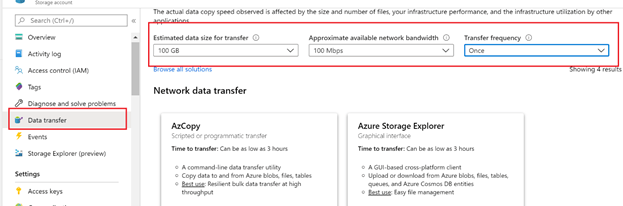
So before doing any data transfer check this service to Search from among the common Azure data transfer solutions to select the best option for your data. For more information about Azure solution for data transfer check ➡  Microsoft article.

Continue reading “Azure Date Transfer Solutions”

Azure Storage Geo-Replication


I explained before How we can use the Geo-replication on Azure SQL and how is very helpful for SQL replication and failover for more information about this subject check this ➡ Article Today we will use the same services for replicated the azure storage data.

  • Previous articles in azure Storage services
  • What is Geo-Replication
  • Azure Storage replication Types
  • How to Implement Geo-Replication on Azure Storage

IF you need to check all of my azure posts ➡ Latest Microsoft Azure Articles and Posts

Previous articles in azure Storage services

Continue reading “Azure Storage Geo-Replication”

Azure VM Backup Soft Delete Security features


I talked before about How we can implement backup on Azure VM using Recovery services vault and we mentioned that recovery services vault can be used for two purpose backup and site recovery but today we will take in one of the azure security feature Soft Delete but before this point, if you need to know how you can implement backup on VM using recovery services vault check this ➡ article and if you need to know how you can implement the site recovery using azure backup vault check this ➡ article.

IF you need to check all of my azure posts ➡ Latest Microsoft Azure Articles and Posts

Soft Delete Life Cycle on Azure Recovery Services vault
Continue reading “Azure VM Backup Soft Delete Security features”

Copy Files to or from Azure Storage using Azcopy


Before starting on How to move files hosted on the azure container using Azcopy command line I highly recommend you to read below articles to know more information about Azure Storage types, features, how to create it, storage replication types, azure storage explorer and How to monitor your azure storage

  • Azure Storage information
  • What is Azcopy
  • Prerequisites
  • Azcopy command details
  • Check File using Azure Storage Explorer

IF you need to check all of my azure posts ➡ Latest Microsoft Azure Articles and Posts

Azure Storage information

Continue reading “Copy Files to or from Azure Storage using Azcopy”

Create Deadlock Alert on Microsoft Azure SQL


Deadlock all of us know the meaning of it and how to manage it on SQL Server on-premises and for how to get alert by it normally we are using Database Mail to generate alert from SQL Server but in Azure, the situation is different because there is no Database Mail in Azure there are services called “Azure Monitor” centralized services for managing all of the alerts on all of the Azure resources and this in of the difference between SQL on Azure and SQL on-premises. From this service we can manage our alerts with defining what is the action we need it (Send Email, Execute Function, Call Services, Send SMS ..etc.), You can access the Monitoring Services from this ➡ link or simply by searching azure portal by (Monitor).

  • Azure Alert Component
  • How to create Deadlocks Alert
  • List by alerts created on Azure
  • Alert Dashboard
  • How to Get the deadlock reports Using Azure Matrices
  • How to check Deadlock using SQL Server Script
  • Other Articles For How to Manage Azure SQL Database

IF you need to check all of my azure posts ➡ Latest Microsoft Azure Articles and Posts

Azure Alert Component

  • Resource: The Azure Resource you need to apply for this Alert role on It and it can be done on the azure subscription itself like alert on cost and budget of the subscription.
  • Condition: it is the logic of the alert what you need to monitor exactly and when
  • Action Group: the action you need to do it when the alert fire on the condition you configure it
  • Matrices: It is like dashboard and reports you can configure it to get some statistics on time and you can build alert on it
  • ALERT DETAILS: alert name and alert description and severity for this alert from (0) to (4)
Continue reading “Create Deadlock Alert on Microsoft Azure SQL”